---
title: How to mark an item as received
description: How to mark an item as received in EcoReturns?
---
[Skip to content](https://help.saara.io/kb/how-to-mark-an-item-as-received#main-content)
[More support](https://help.saara.io/kb/kb-tickets/new?hsLang=en) [Customer portal](https://help.saara.io/tickets-view?hsLang=en)
[.png?width=250&height=100&name=Saara-Logo%20(250x100).png)](https://saara.io/?hsLang=en)
- Products
Show submenu for Products
- [EcoReturns](https://hs.saara.io/ecoreturns)
- [EcoShip](https://hs.saara.io/ecoship)
- [FlyOS](https://hs.saara.io/ai-agents-for-ecommerce)
- Resources
Show submenu for Resources
- [Knowledge base](https://saara.io/saara-knowledge-base?hsLang=en-us)
- [Support](https://saara.io/ecoreturns-support?hsLang=en-us)
Open main navigation
Close main navigation
- Products
Show submenu for Products
- [EcoReturns](https://hs.saara.io/ecoreturns)
- [EcoShip](https://hs.saara.io/ecoship)
- [FlyOS](https://hs.saara.io/ai-agents-for-ecommerce)
- Resources
Show submenu for Resources
- [Knowledge base](https://saara.io/saara-knowledge-base?hsLang=en-us)
- [Support](https://saara.io/ecoreturns-support?hsLang=en-us)
- [More support](https://help.saara.io/kb/kb-tickets/new)
- [Customer portal](https://help.saara.io/tickets-view)
- [Raise a Ticket](https://44348979.hs-sites.com/ecoreturns-support)
[Raise a Ticket](https://44348979.hs-sites.com/ecoreturns-support?hsLang=en)
How can we help you?
- There are no suggestions because the search field is empty.
1. [Saara-knowledge-base](https://help.saara.io/kb?hsLang=en)
2. [EcoReturns](https://help.saara.io/kb/ecoreturns?hsLang=en)
3. [FAQs](https://help.saara.io/kb/ecoreturns?hsLang=en#faqs)
# How to mark an item as received
### How to mark an item as received
Modified on Mon, 10 Mar at 5:19 AM
### **Introduction**
In today’s world, customers are expecting a smooth and transparent returns process. By marking an item as received, customers would be automatically notified keeping them informed about the status of their return. You can also grade the items that are returned and even restock if it is in good state.
EcoReturns makes it extremely easy for you to mark an item as received as soon as you get the item back to your warehouse. EcoReturns also allows you to setup refund automations so that they are triggered as soon as you mark an item as received. You can learn more about it [here](https://saara.ai/ecoreturns-knowledge-base/how-to-automatically-issue-refund-for-return-requests)
### **Steps to follow**
Follow the steps below to "**Mark an item as received**" in just a few clicks:
1\. Login to your EcoReturns dashboard.
2\. After logging in, select ‘**Returns**’ from the left-side of the menu 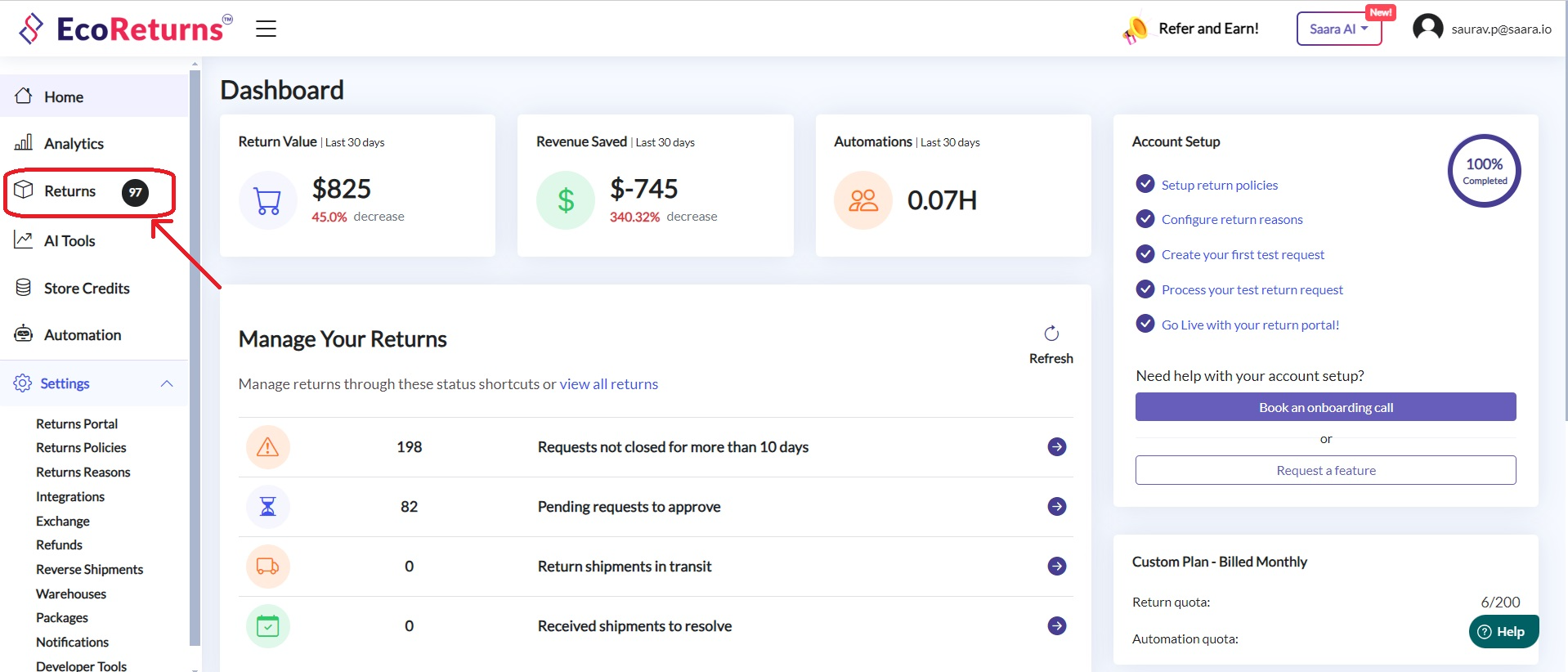
3\. Next, you will see the list of the returns and exchanges that your customers have initiated 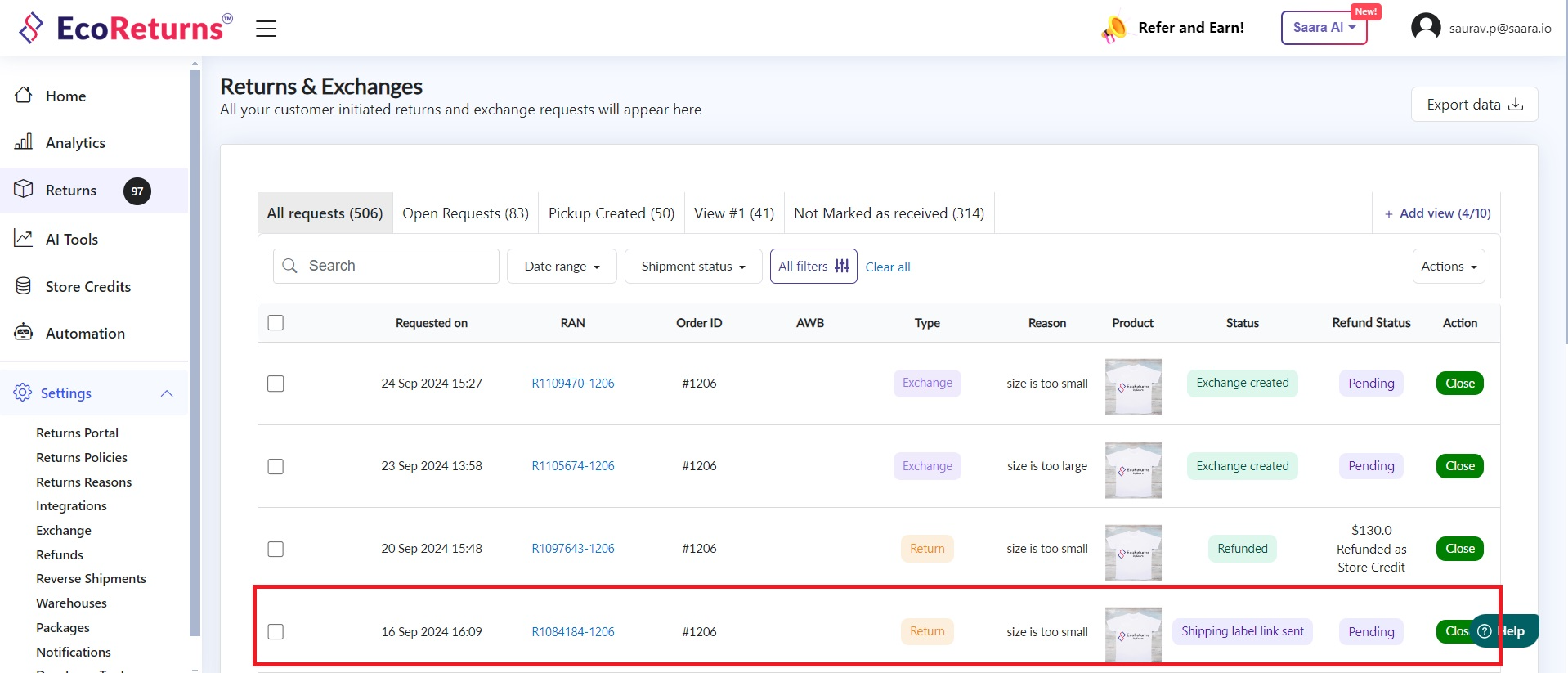
4\. Click on any **Request** for which you want to mark the items as recieved
5\. You will be taken to the detailed order page. Click on '**Mark as received'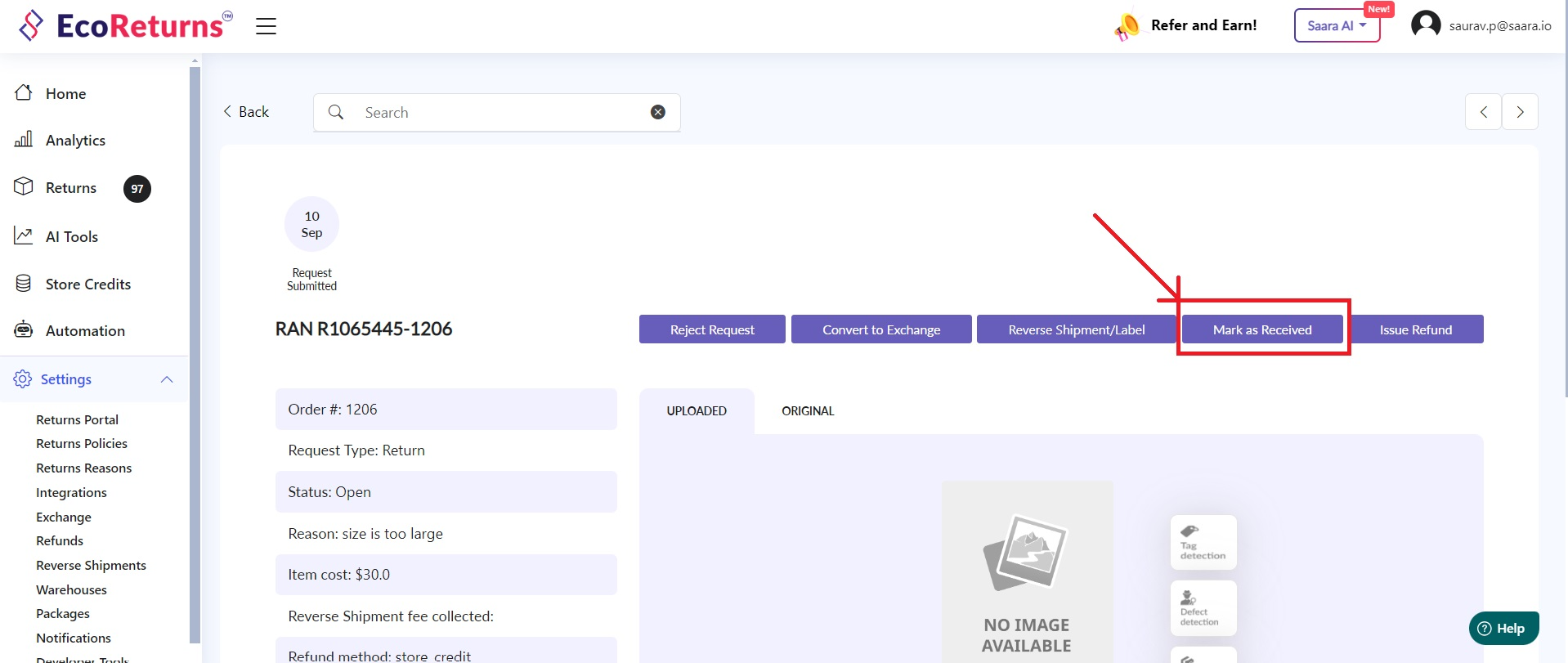**
6\. You can grade the item based on it's condition, **restock** it to your inventory and Mark it as received.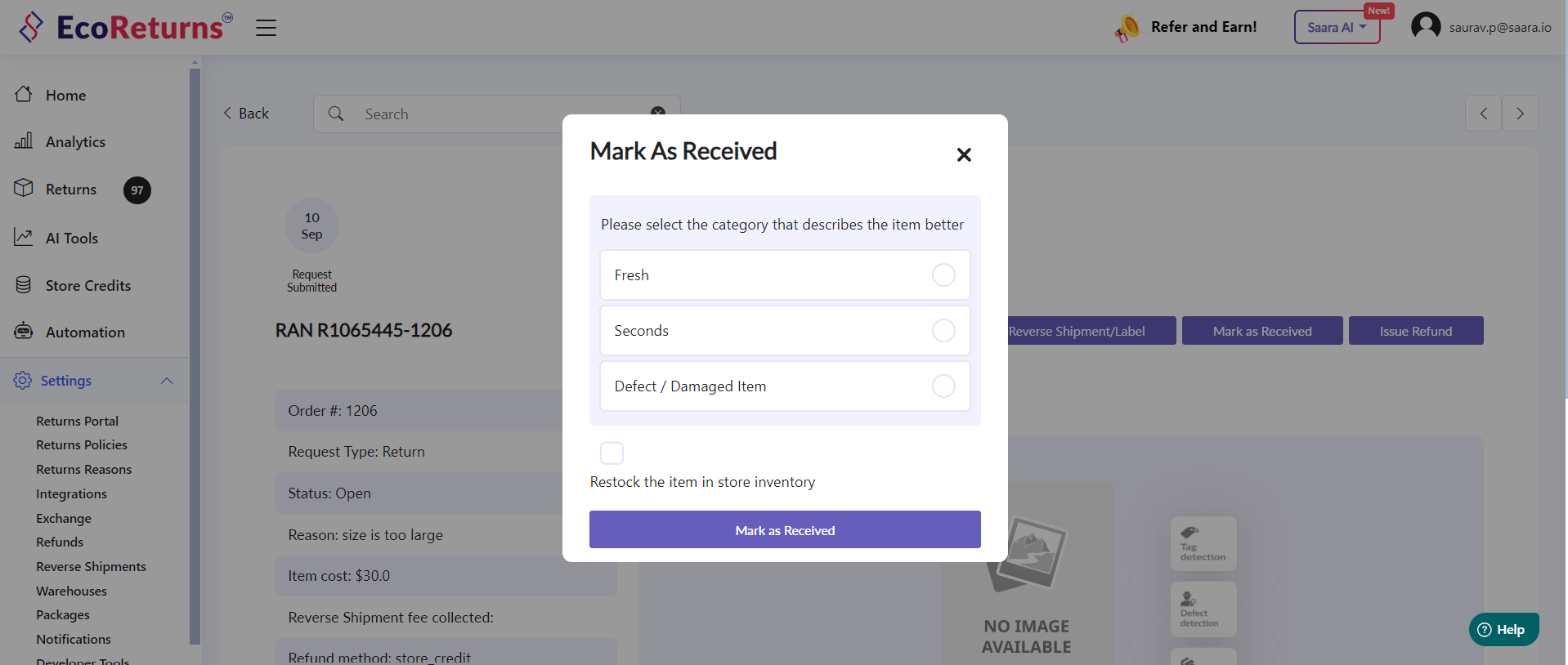
7\. Following grades are present in EcoReturns
- Fresh
- Seconds
- Defect / Damaged item
8\. If the item is **Fresh **or** Seconds **you can restock the item in store inventory by selecting the checkbox near "**Restock the item in store inventory".**
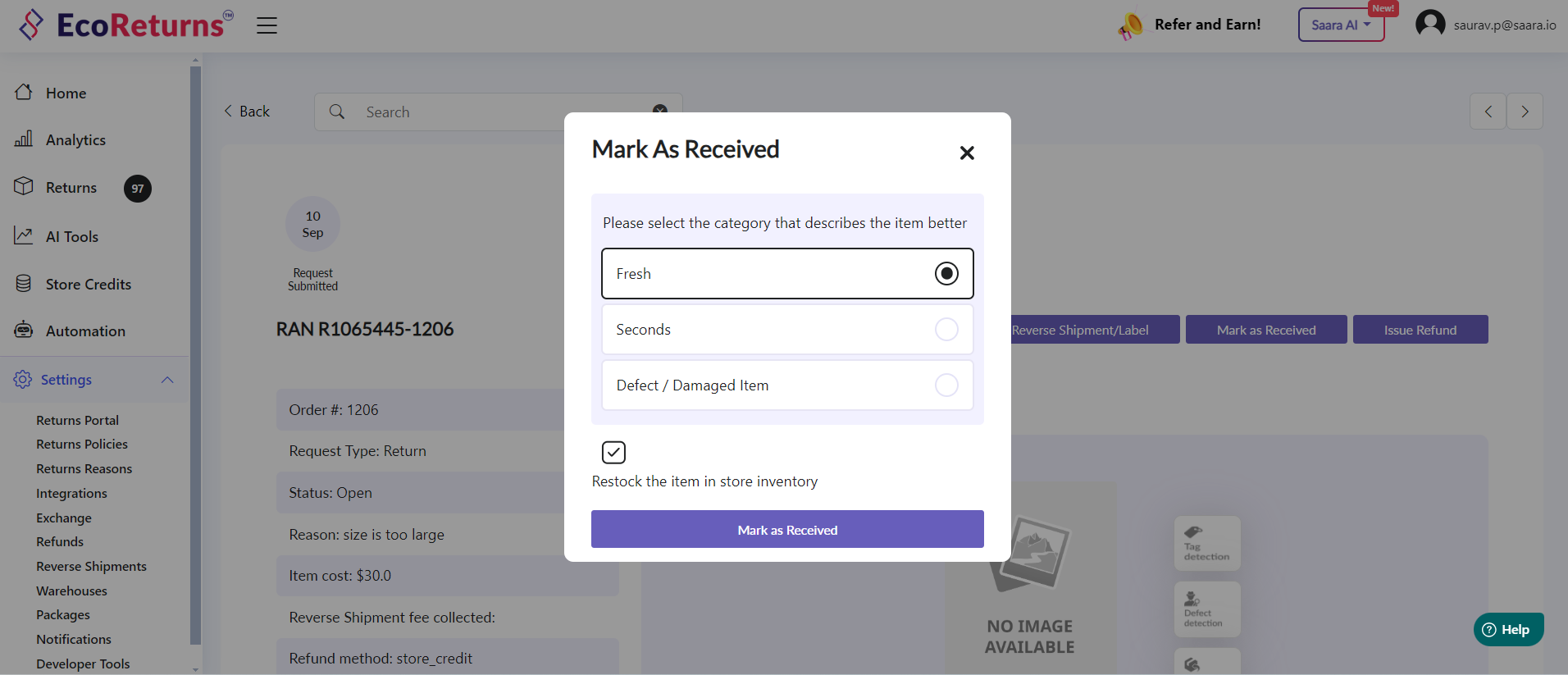
9\. At last click on "**Mark as Received" **to complete your action.
10\. If you enabled your notification, your customer will be notified of the same and be informed about the status of their return.
Isn’t it easy? Now go ahead and mark your order as received by following the above steps.
Here’s a detailed video on how you mark your order as received on the EcoReturns dashboard
- [EcoReturns](https://help.saara.io/kb/ecoreturns?hsLang=en#main-content)
- [Getting Started](https://help.saara.io/kb/ecoreturns?hsLang=en#getting-started)
- [Settings](https://help.saara.io/kb/ecoreturns?hsLang=en#settings)
- [Integrations](https://help.saara.io/kb/ecoreturns?hsLang=en#integrations)
- [Automations](https://help.saara.io/kb/ecoreturns?hsLang=en#automations)
- [FAQs](https://help.saara.io/kb/ecoreturns?hsLang=en#faqs)
- [AI Agents](https://help.saara.io/kb/ai-agents?hsLang=en#main-content)
- [Getting Started](https://help.saara.io/kb/ai-agents?hsLang=en#getting-started)
- [FAQs](https://help.saara.io/kb/ai-agents?hsLang=en#faqs)
- [Integrations](https://help.saara.io/kb/ai-agents?hsLang=en#integrations)
- [EcoShip](https://help.saara.io/kb/ecoship?hsLang=en#main-content)
- [Getting Started](https://help.saara.io/kb/ecoship?hsLang=en#getting-started)
- [FAQs](https://help.saara.io/kb/faqs?hsLang=en#main-content)
- [Managing Coupon Codes](https://help.saara.io/kb/faqs?hsLang=en#managing-coupon-codes)
- [Return Policy](https://help.saara.io/kb/faqs?hsLang=en#return-policy)
- [Settings](https://help.saara.io/kb/settings?hsLang=en#main-content)
- [Account Settings](https://help.saara.io/kb/settings?hsLang=en#account-settings)
- Products
- [EcoReturns](https://hs.saara.io/ecoreturns)
- [EcoShip](https://hs.saara.io/ecoship)
- [FlyOS](https://hs.saara.io/ai-agents-for-ecommerce)
- Resources
- [Knowledge base](https://saara.io/saara-knowledge-base?hsLang=en-us)
- [Support](https://saara.io/ecoreturns-support?hsLang=en-us)
[.png?width=250&height=100&name=Saara-Logo%20(250x100).png "Saara-Logo (250x100)")](https://saara.io?hsLang=en)
[mailto:care@saara.io](mailto:care@saara.io)
Copyright © 2026, Saara Inc