---
title: How to configure shopper notifications?
description: How to configure shopper notifications in EcoReturns?
---
[Skip to content](https://help.saara.io/kb/how-to-configure-shopper-notifications#main-content)
[More support](https://help.saara.io/kb/kb-tickets/new?hsLang=en) [Customer portal](https://help.saara.io/tickets-view?hsLang=en)
[.png?width=250&height=100&name=Saara-Logo%20(250x100).png)](https://saara.io/?hsLang=en)
- Products
Show submenu for Products
- [EcoReturns](https://hs.saara.io/ecoreturns)
- [EcoShip](https://hs.saara.io/ecoship)
- [FlyOS](https://hs.saara.io/ai-agents-for-ecommerce)
- Resources
Show submenu for Resources
- [Knowledge base](https://saara.io/saara-knowledge-base?hsLang=en-us)
- [Support](https://saara.io/ecoreturns-support?hsLang=en-us)
Open main navigation
Close main navigation
- Products
Show submenu for Products
- [EcoReturns](https://hs.saara.io/ecoreturns)
- [EcoShip](https://hs.saara.io/ecoship)
- [FlyOS](https://hs.saara.io/ai-agents-for-ecommerce)
- Resources
Show submenu for Resources
- [Knowledge base](https://saara.io/saara-knowledge-base?hsLang=en-us)
- [Support](https://saara.io/ecoreturns-support?hsLang=en-us)
- [More support](https://help.saara.io/kb/kb-tickets/new)
- [Customer portal](https://help.saara.io/tickets-view)
- [Raise a Ticket](https://44348979.hs-sites.com/ecoreturns-support)
[Raise a Ticket](https://44348979.hs-sites.com/ecoreturns-support?hsLang=en)
How can we help you?
- There are no suggestions because the search field is empty.
1. [Saara-knowledge-base](https://help.saara.io/kb?hsLang=en)
2. [EcoReturns](https://help.saara.io/kb/ecoreturns?hsLang=en)
3. [Settings](https://help.saara.io/kb/ecoreturns?hsLang=en#settings)
# How to configure shopper notifications?
### How to configure shopper notifications?
Modified on Mon, 10 Mar at 9:28 AM
### **Introduction**
When shoppers initiate a return or exchange, they expect real-time updates on their request status, shipping instructions, and refund processing timelines etc
By automating return notifications, brands can ensure transparency and keep shoppers informed at every stage whether it's return approval, shipment tracking, or refund confirmation. This reduces uncertainty, minimizes shopper inquiries, and improves overall satisfaction.
With EcoReturns, brands can streamline communication, send proactive updates, and provide a seamless return experience to their shoppers.
### **Configure shopper notifications**
Follow the steps below to **Configure any notification **in just a few clicks:
1\. Login to your EcoReturns dashboard.
2\. After logging in, select ‘**Notifications**’ from the left-side of the menu under '**Settings'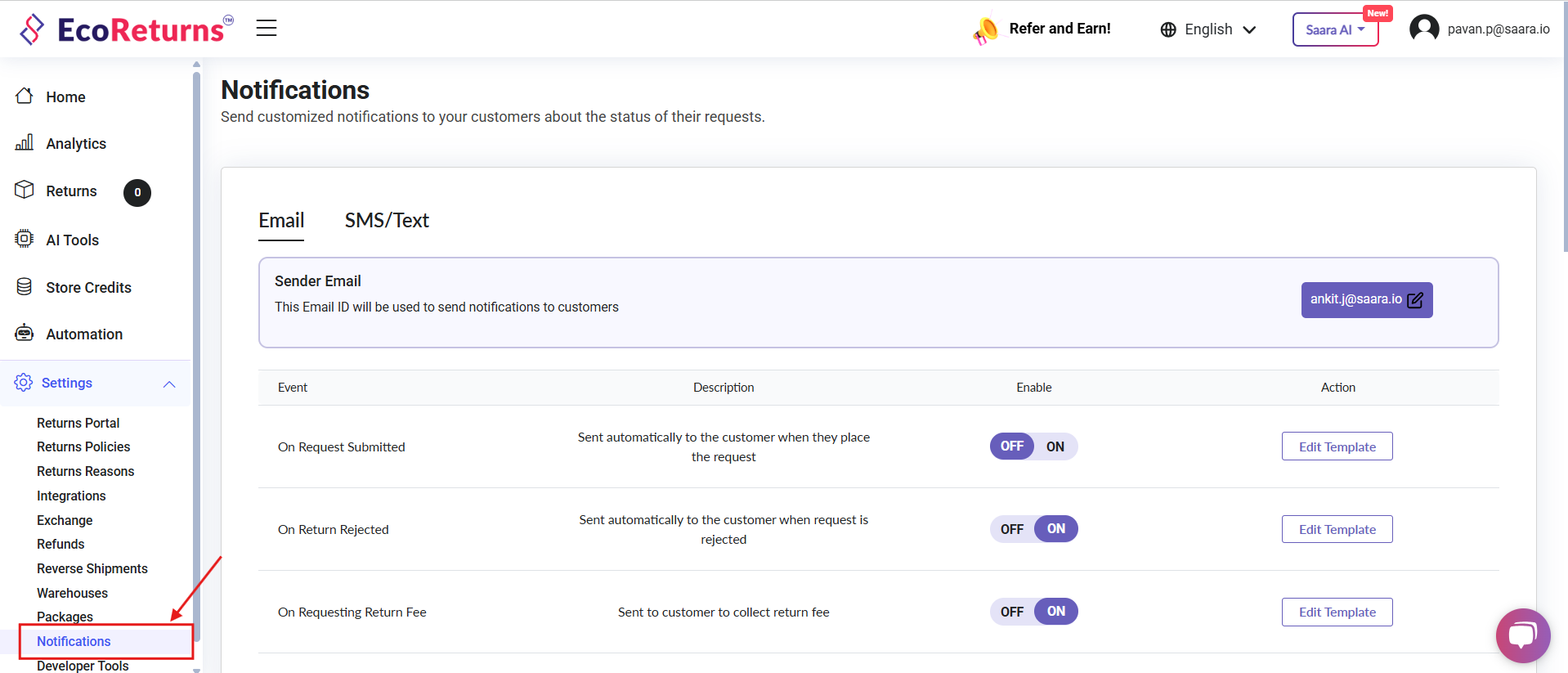**
3\. EcoReturns has pre-configured templates for each return event till the return or exchange request is closed.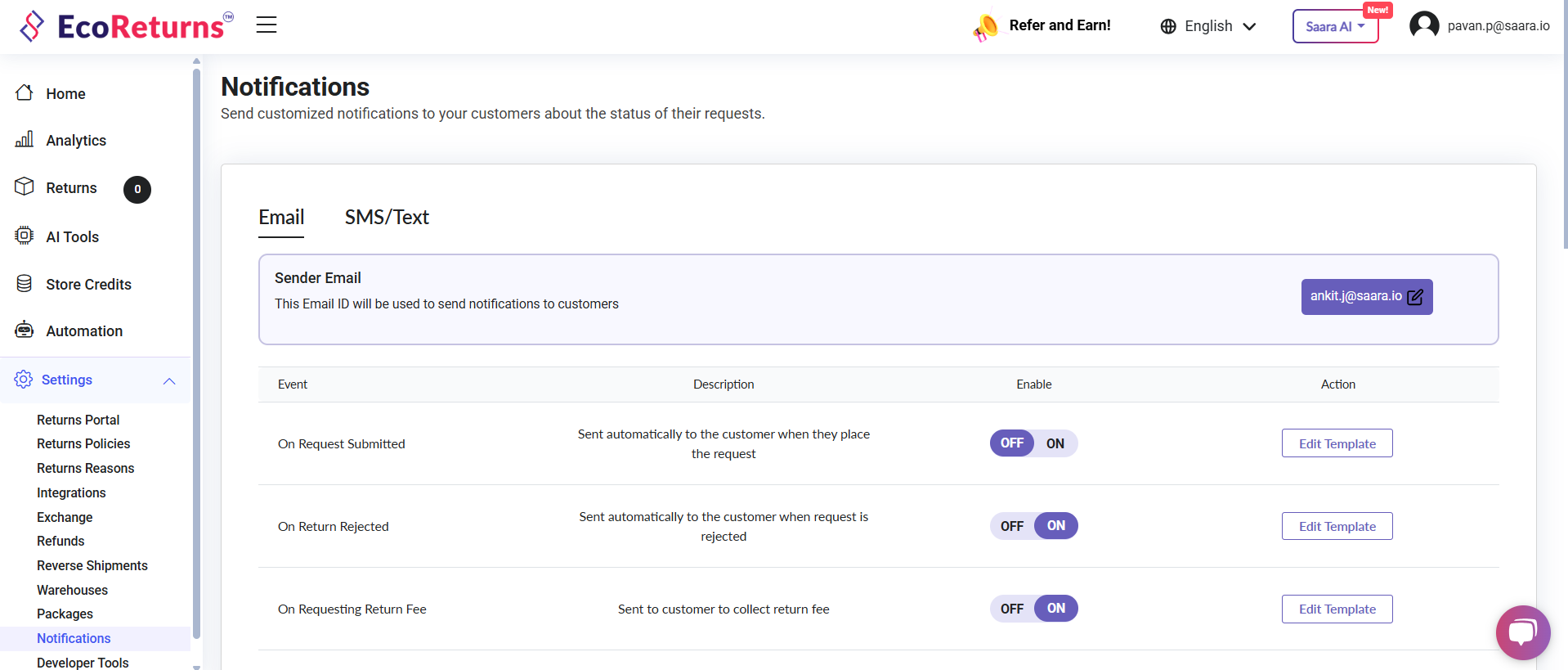
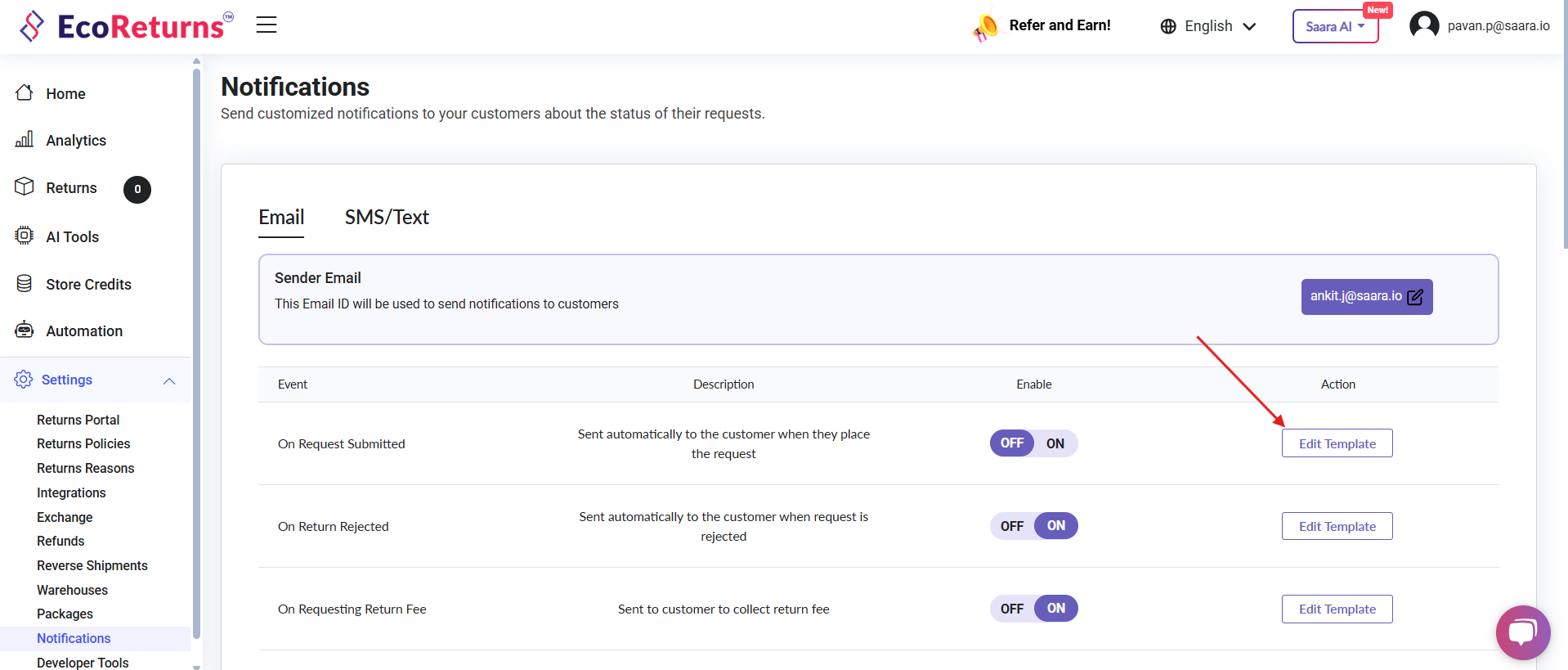
4\. To modify any template, click on **Edit template**
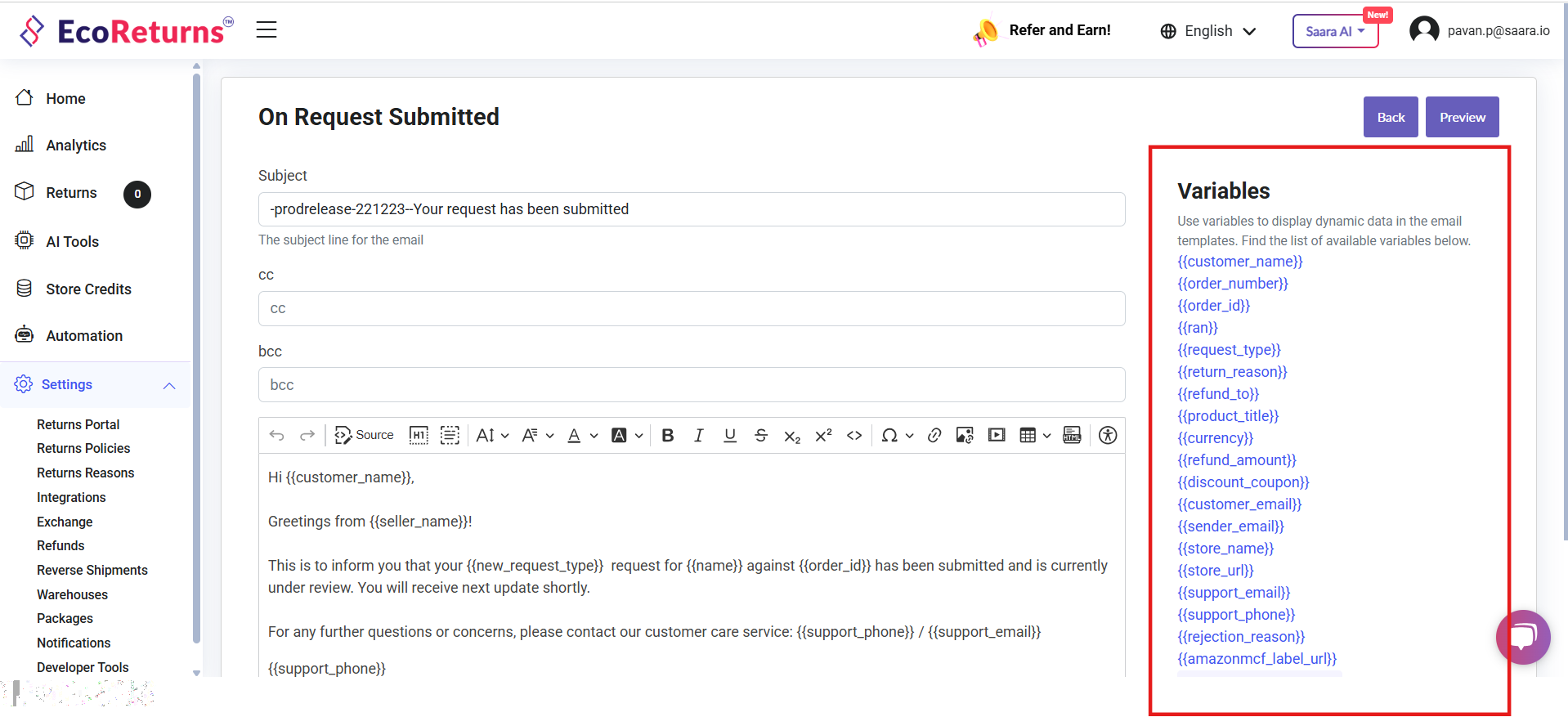
**5. **Once you navigate to the Edit template page you will be able to see the Email Subject, cc, bcc email and body of the Email sent to the customer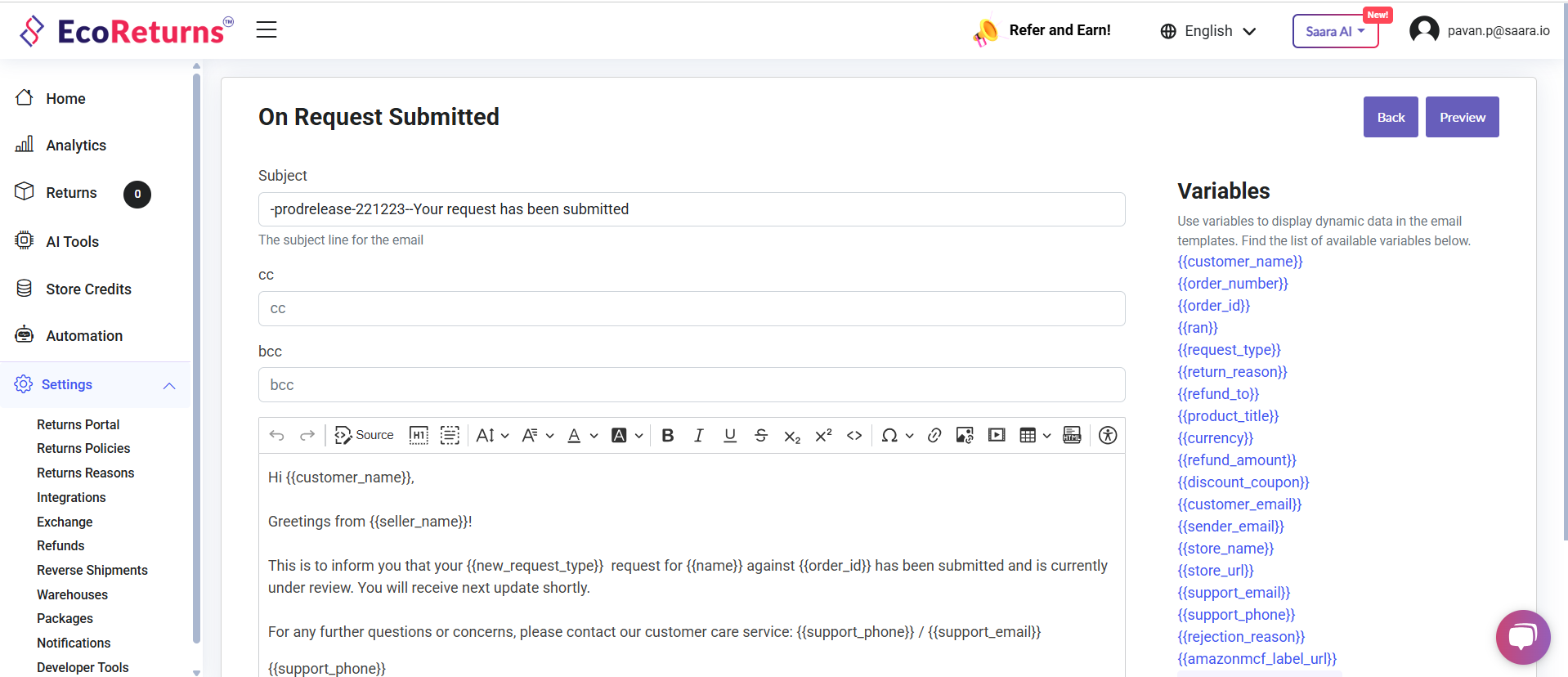
6\. You can modify the template as per your branding. You can also include your mail in bcc or cc if you want to get notified each time the notification is sent to the customer
7\. Dynamic variables on the right help you to display data in the email which changes from order to order. You can use them in the Subject, body of the email template.
8\. Once you configure the template, you can preview it using the preview button on top right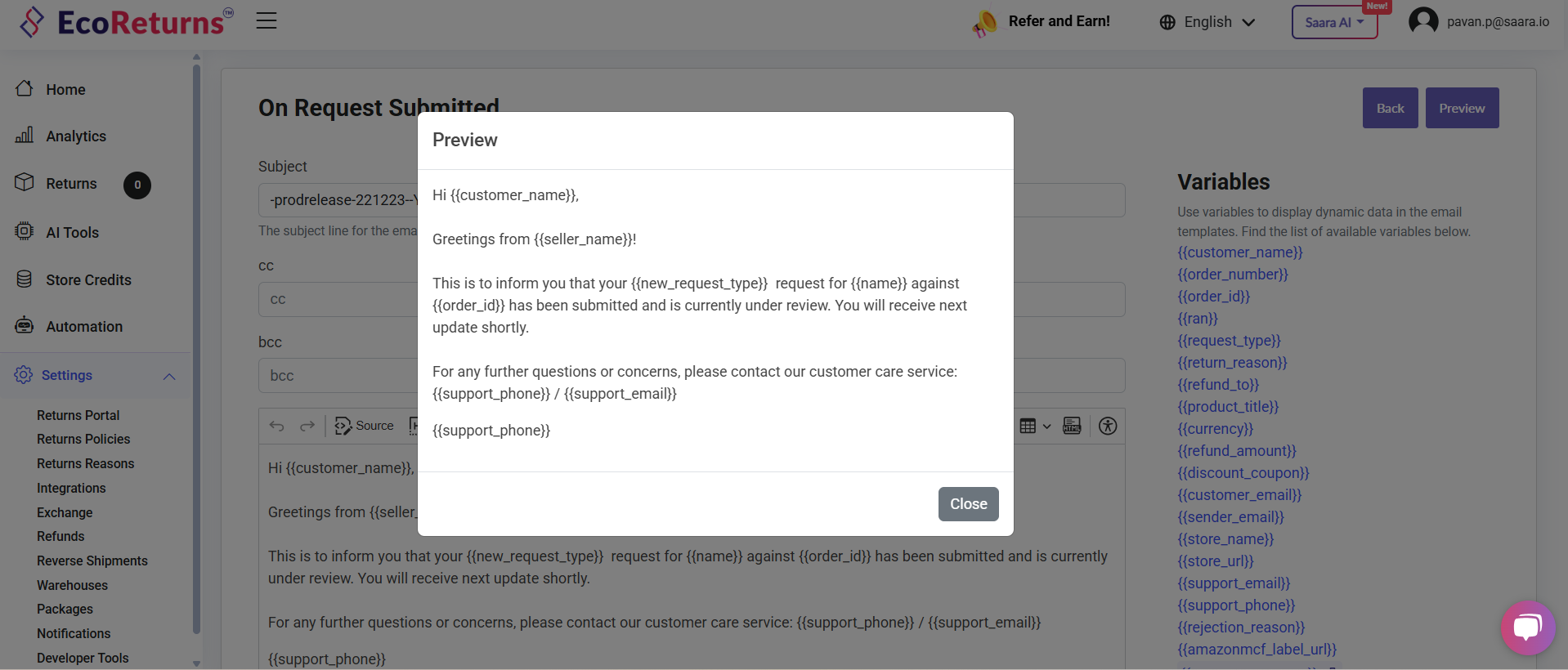
9\. Finally you can save the template after the changes are done and turn the notifications on so that they are sent to the shopper.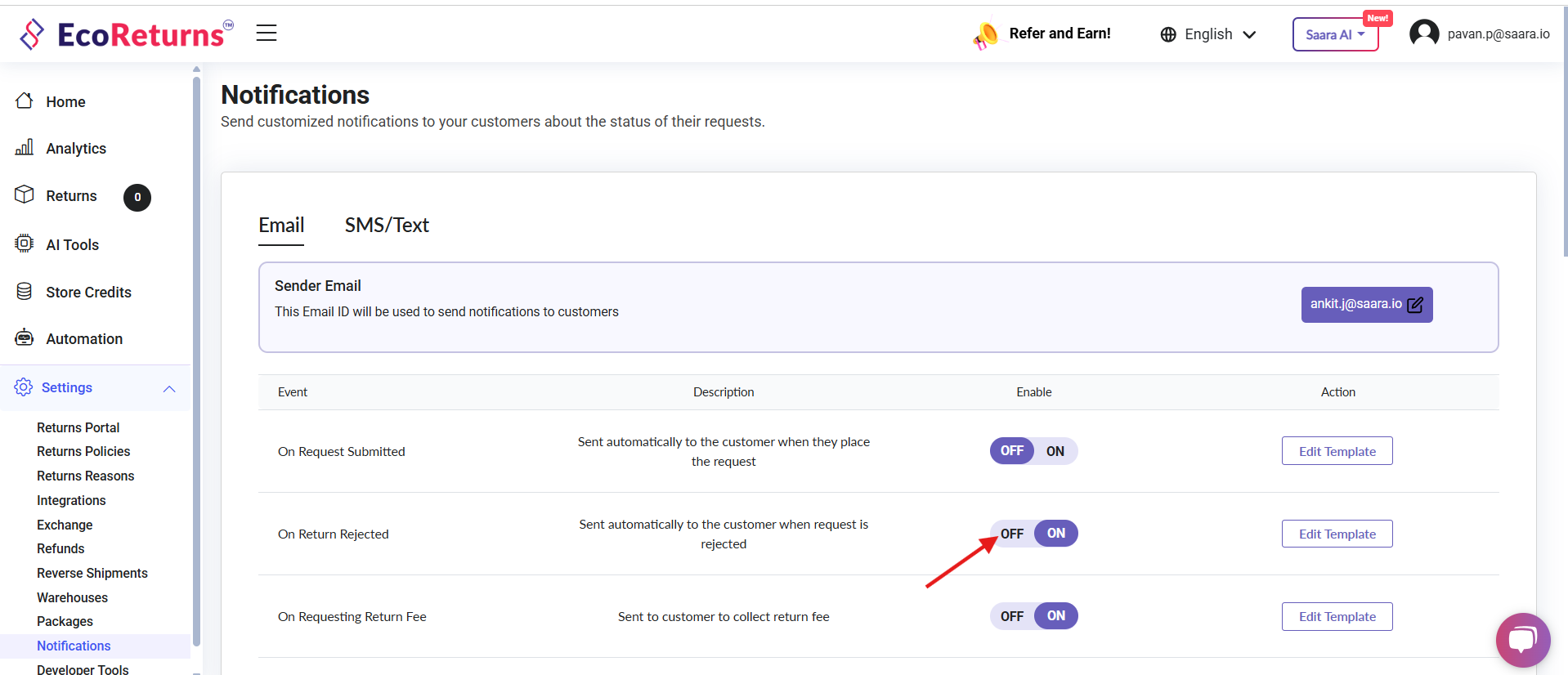
- [EcoReturns](https://help.saara.io/kb/ecoreturns?hsLang=en#main-content)
- [Getting Started](https://help.saara.io/kb/ecoreturns?hsLang=en#getting-started)
- [Settings](https://help.saara.io/kb/ecoreturns?hsLang=en#settings)
- [Integrations](https://help.saara.io/kb/ecoreturns?hsLang=en#integrations)
- [Automations](https://help.saara.io/kb/ecoreturns?hsLang=en#automations)
- [FAQs](https://help.saara.io/kb/ecoreturns?hsLang=en#faqs)
- [AI Agents](https://help.saara.io/kb/ai-agents?hsLang=en#main-content)
- [Getting Started](https://help.saara.io/kb/ai-agents?hsLang=en#getting-started)
- [FAQs](https://help.saara.io/kb/ai-agents?hsLang=en#faqs)
- [Integrations](https://help.saara.io/kb/ai-agents?hsLang=en#integrations)
- [EcoShip](https://help.saara.io/kb/ecoship?hsLang=en#main-content)
- [Getting Started](https://help.saara.io/kb/ecoship?hsLang=en#getting-started)
- [FAQs](https://help.saara.io/kb/faqs?hsLang=en#main-content)
- [Managing Coupon Codes](https://help.saara.io/kb/faqs?hsLang=en#managing-coupon-codes)
- [Return Policy](https://help.saara.io/kb/faqs?hsLang=en#return-policy)
- [Settings](https://help.saara.io/kb/settings?hsLang=en#main-content)
- [Account Settings](https://help.saara.io/kb/settings?hsLang=en#account-settings)
- Products
- [EcoReturns](https://hs.saara.io/ecoreturns)
- [EcoShip](https://hs.saara.io/ecoship)
- [FlyOS](https://hs.saara.io/ai-agents-for-ecommerce)
- Resources
- [Knowledge base](https://saara.io/saara-knowledge-base?hsLang=en-us)
- [Support](https://saara.io/ecoreturns-support?hsLang=en-us)
[.png?width=250&height=100&name=Saara-Logo%20(250x100).png "Saara-Logo (250x100)")](https://saara.io?hsLang=en)
[mailto:care@saara.io](mailto:care@saara.io)
Copyright © 2026, Saara Inc