---
title: How to automatically create exchange orders?
description: Automatic exchange order creation upon pickup of the older item
---
[Skip to content](https://help.saara.io/kb/how-to-automatically-create-exchange-orders#main-content)
[More support](https://help.saara.io/kb/kb-tickets/new?hsLang=en) [Customer portal](https://help.saara.io/tickets-view?hsLang=en)
[.png?width=250&height=100&name=Saara-Logo%20(250x100).png)](https://saara.io/?hsLang=en)
- Products
Show submenu for Products
- [EcoReturns](https://hs.saara.io/ecoreturns)
- [EcoShip](https://hs.saara.io/ecoship)
- [FlyOS](https://hs.saara.io/ai-agents-for-ecommerce)
- Resources
Show submenu for Resources
- [Knowledge base](https://saara.io/saara-knowledge-base?hsLang=en-us)
- [Support](https://saara.io/ecoreturns-support?hsLang=en-us)
Open main navigation
Close main navigation
- Products
Show submenu for Products
- [EcoReturns](https://hs.saara.io/ecoreturns)
- [EcoShip](https://hs.saara.io/ecoship)
- [FlyOS](https://hs.saara.io/ai-agents-for-ecommerce)
- Resources
Show submenu for Resources
- [Knowledge base](https://saara.io/saara-knowledge-base?hsLang=en-us)
- [Support](https://saara.io/ecoreturns-support?hsLang=en-us)
- [More support](https://help.saara.io/kb/kb-tickets/new)
- [Customer portal](https://help.saara.io/tickets-view)
- [Raise a Ticket](https://44348979.hs-sites.com/ecoreturns-support)
[Raise a Ticket](https://44348979.hs-sites.com/ecoreturns-support?hsLang=en)
How can we help you?
- There are no suggestions because the search field is empty.
1. [Saara-knowledge-base](https://help.saara.io/kb?hsLang=en)
2. [EcoReturns](https://help.saara.io/kb/ecoreturns?hsLang=en)
3. [Automations](https://help.saara.io/kb/ecoreturns?hsLang=en#automations)
# How to automatically create exchange orders?
## Automatically create exchange orders based on events
When customer submits an exchange request, they need to make a choice of the product they need to exchange with. The details are captured and a new exchange order can be created on a click of a button from the dashboard. However, when you do not want to do this manually, you can set automation rules to create exchange orders upon a trigger of certain events for e.g. upon once the old item is picked up. Follow the steps below to set it up as per your preferences:
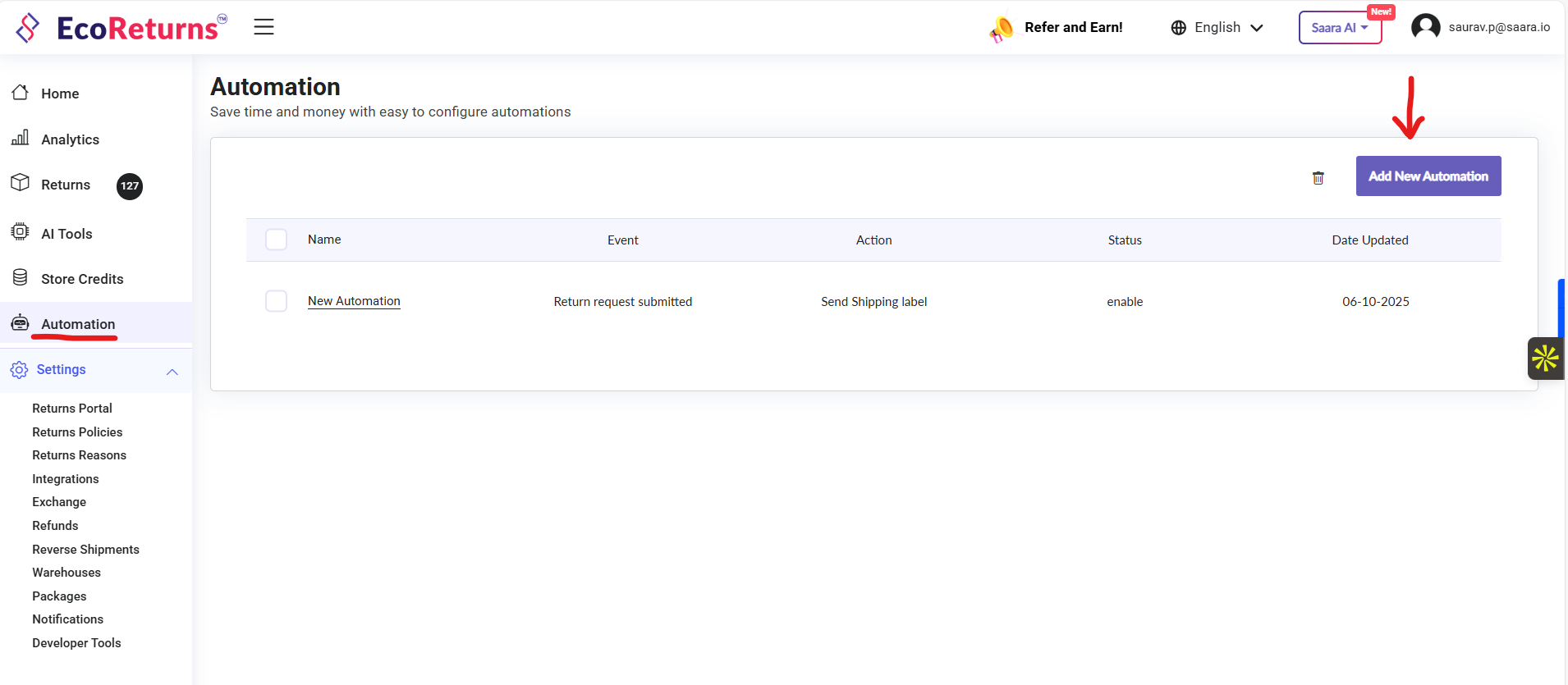
1\. Open Automation and click on Add New Automation:
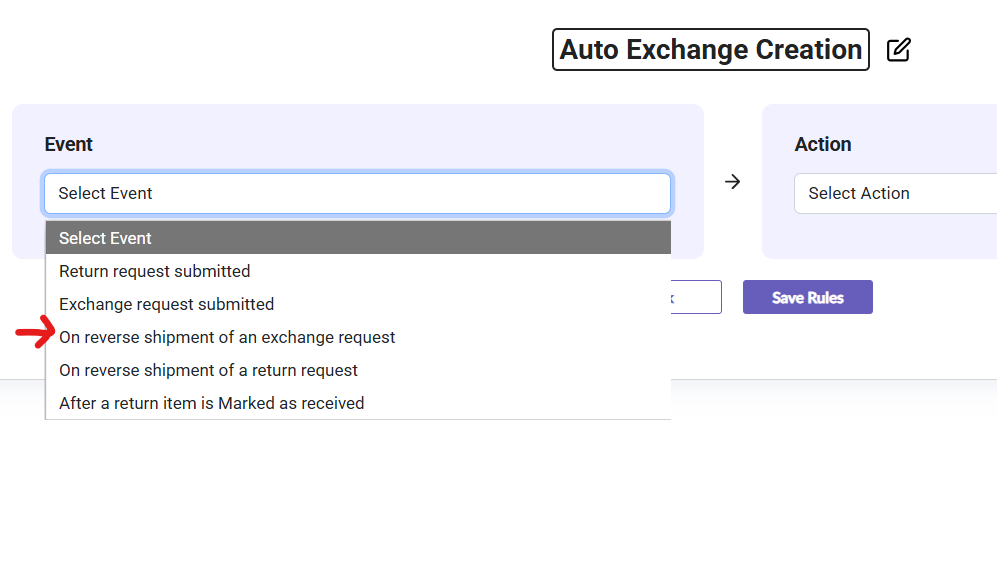
2\. Change the name of the automation e.g. "Auto Exchange Creation"\> From the dropdown select: "On reverse shipment of exchange request"
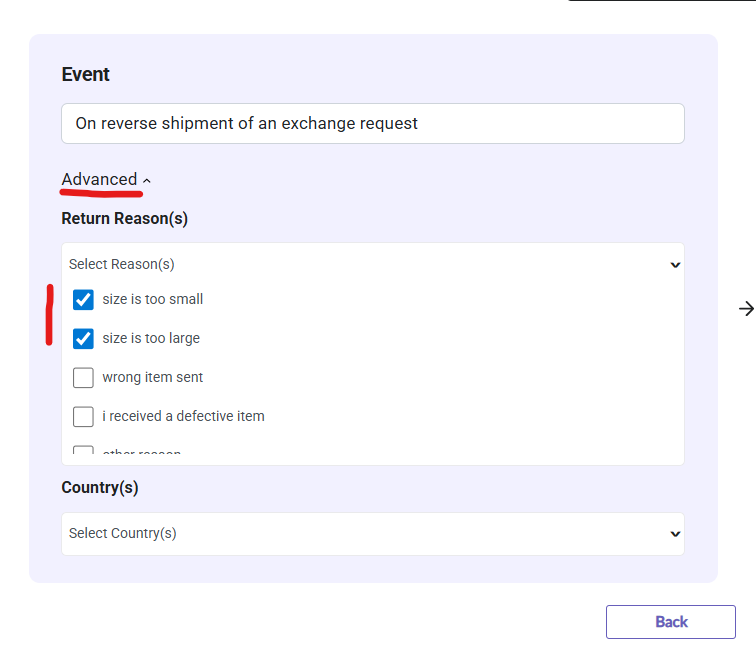
3\. Under Advanced settings, select the return reason for which you want this automation to run:
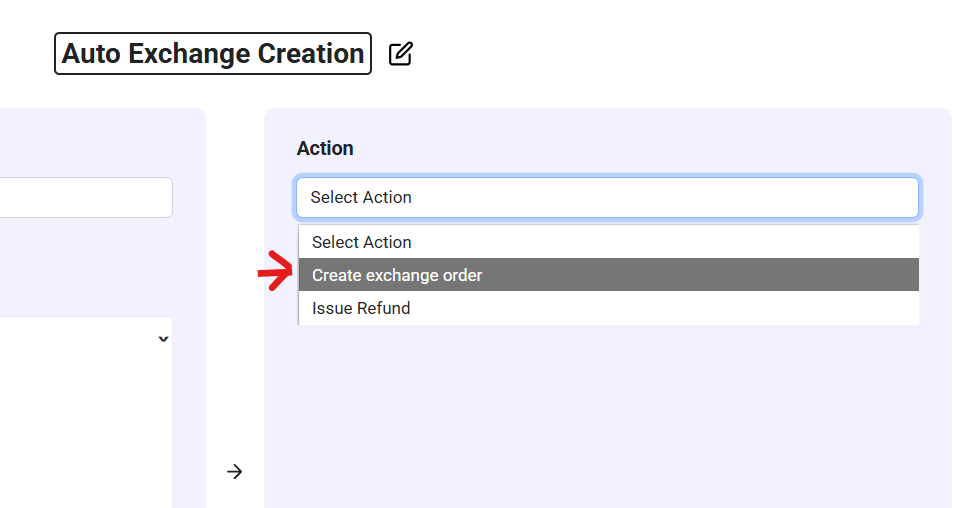
4\. From the Event section, select "Create exchagne order". This will automatically create an exchange order once the old item gets picked up only for the return reasons and country that is selected.
- [EcoReturns](https://help.saara.io/kb/ecoreturns?hsLang=en#main-content)
- [Getting Started](https://help.saara.io/kb/ecoreturns?hsLang=en#getting-started)
- [Settings](https://help.saara.io/kb/ecoreturns?hsLang=en#settings)
- [Integrations](https://help.saara.io/kb/ecoreturns?hsLang=en#integrations)
- [Automations](https://help.saara.io/kb/ecoreturns?hsLang=en#automations)
- [FAQs](https://help.saara.io/kb/ecoreturns?hsLang=en#faqs)
- [AI Agents](https://help.saara.io/kb/ai-agents?hsLang=en#main-content)
- [Getting Started](https://help.saara.io/kb/ai-agents?hsLang=en#getting-started)
- [FAQs](https://help.saara.io/kb/ai-agents?hsLang=en#faqs)
- [Integrations](https://help.saara.io/kb/ai-agents?hsLang=en#integrations)
- [EcoShip](https://help.saara.io/kb/ecoship?hsLang=en#main-content)
- [Getting Started](https://help.saara.io/kb/ecoship?hsLang=en#getting-started)
- [FAQs](https://help.saara.io/kb/faqs?hsLang=en#main-content)
- [Managing Coupon Codes](https://help.saara.io/kb/faqs?hsLang=en#managing-coupon-codes)
- [Return Policy](https://help.saara.io/kb/faqs?hsLang=en#return-policy)
- [Settings](https://help.saara.io/kb/settings?hsLang=en#main-content)
- [Account Settings](https://help.saara.io/kb/settings?hsLang=en#account-settings)
- Products
- [EcoReturns](https://hs.saara.io/ecoreturns)
- [EcoShip](https://hs.saara.io/ecoship)
- [FlyOS](https://hs.saara.io/ai-agents-for-ecommerce)
- Resources
- [Knowledge base](https://saara.io/saara-knowledge-base?hsLang=en-us)
- [Support](https://saara.io/ecoreturns-support?hsLang=en-us)
[.png?width=250&height=100&name=Saara-Logo%20(250x100).png "Saara-Logo (250x100)")](https://saara.io?hsLang=en)
[mailto:care@saara.io](mailto:care@saara.io)
Copyright © 2026, Saara Inc