---
title: How to automatically create exchange order?
description: How to automatically create exchange order in EcoReturns
---
[Skip to content](https://help.saara.io/kb/how-to-automatically-create-exchange-order#main-content)
[More support](https://help.saara.io/kb/kb-tickets/new?hsLang=en) [Customer portal](https://help.saara.io/tickets-view?hsLang=en)
[.png?width=250&height=100&name=Saara-Logo%20(250x100).png)](https://saara.io/?hsLang=en)
- Products
Show submenu for Products
- [EcoReturns](https://hs.saara.io/ecoreturns)
- [EcoShip](https://hs.saara.io/ecoship)
- [FlyOS](https://hs.saara.io/ai-agents-for-ecommerce)
- Resources
Show submenu for Resources
- [Knowledge base](https://saara.io/saara-knowledge-base?hsLang=en-us)
- [Support](https://saara.io/ecoreturns-support?hsLang=en-us)
Open main navigation
Close main navigation
- Products
Show submenu for Products
- [EcoReturns](https://hs.saara.io/ecoreturns)
- [EcoShip](https://hs.saara.io/ecoship)
- [FlyOS](https://hs.saara.io/ai-agents-for-ecommerce)
- Resources
Show submenu for Resources
- [Knowledge base](https://saara.io/saara-knowledge-base?hsLang=en-us)
- [Support](https://saara.io/ecoreturns-support?hsLang=en-us)
- [More support](https://help.saara.io/kb/kb-tickets/new)
- [Customer portal](https://help.saara.io/tickets-view)
- [Raise a Ticket](https://44348979.hs-sites.com/ecoreturns-support)
[Raise a Ticket](https://44348979.hs-sites.com/ecoreturns-support?hsLang=en)
How can we help you?
- There are no suggestions because the search field is empty.
1. [Saara-knowledge-base](https://help.saara.io/kb?hsLang=en)
2. [EcoReturns](https://help.saara.io/kb/ecoreturns?hsLang=en)
3. [Settings](https://help.saara.io/kb/ecoreturns?hsLang=en#settings)
# How to automatically create exchange order?
### How to automatically create exchange order?
Modified on Fri, 13 Sep, 2024 at 3:19 AM
In today’s fast-paced e-commerce environment, efficient return processing has become a critical factor in maintaining customer satisfaction and operational success. As online shopping grows, so does the volume of returns, making it increasingly difficult for stores to manage without scalable solutions. This is where EcoReturns automation steps in as a game-changer. By automating return processes, you can significantly reduce manual labor, cut down on errors, and improve turnaround times.
In this article, we’ll explore how you can automatically issue refund after a return of reverse shipment or after an item is mark as received.
### **Here's how Ecobot automation can help you**
1. You can automatically create an exchange order as soon as the item is shipped from the customer.
2. This reduces the Turn around time as EcoReturns automatically captures the shipping status from your logistics carrier and then runs the automation.
3. You can automatically create exchange orders only for specific return reasons configured on your store.
### **How to setup refund automation**
1. Access the **Automation **page from the left side menu. 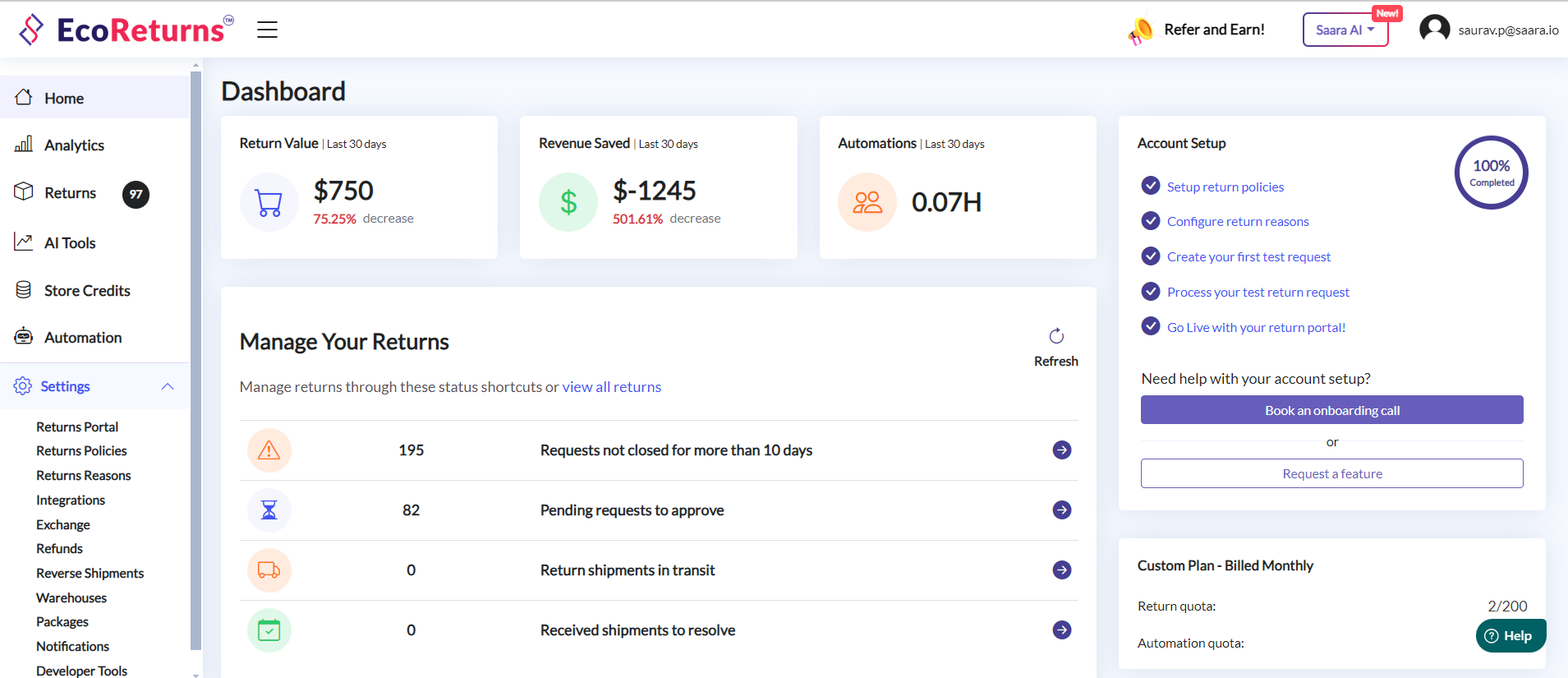
2. Click on **Add New Automation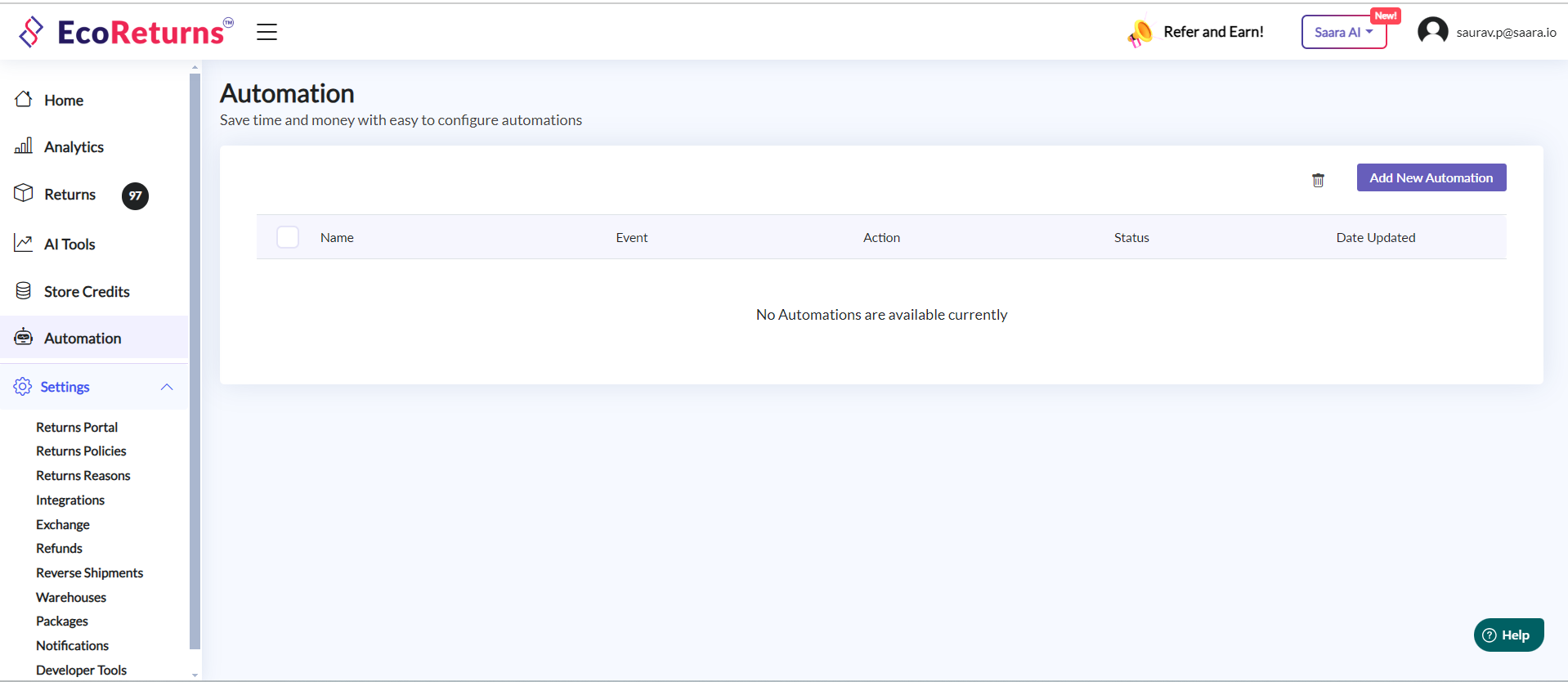**
3. You can rename the automation as **Exchange order automation **by clicking on edit icon beside automation name.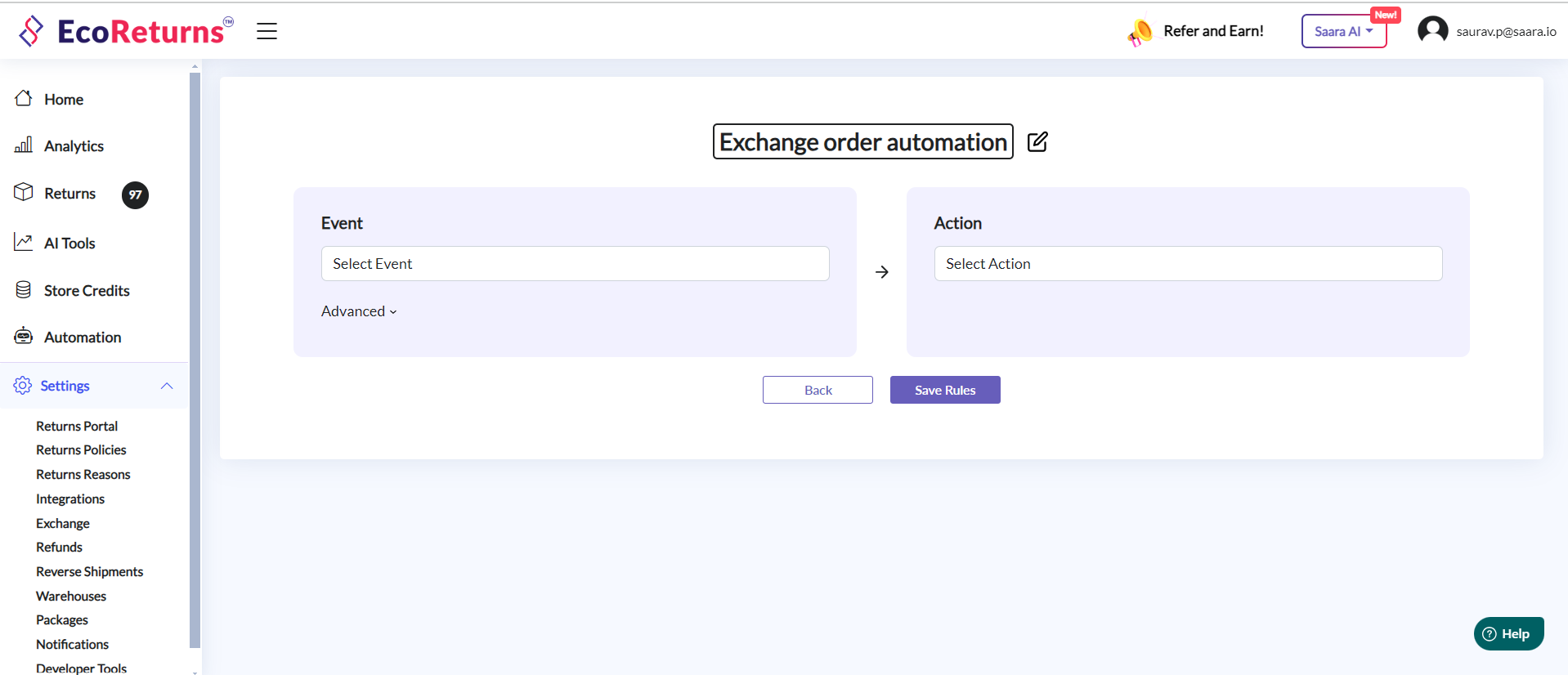
4. You can select the **Event** as **On reverse shipment of a exchange request **
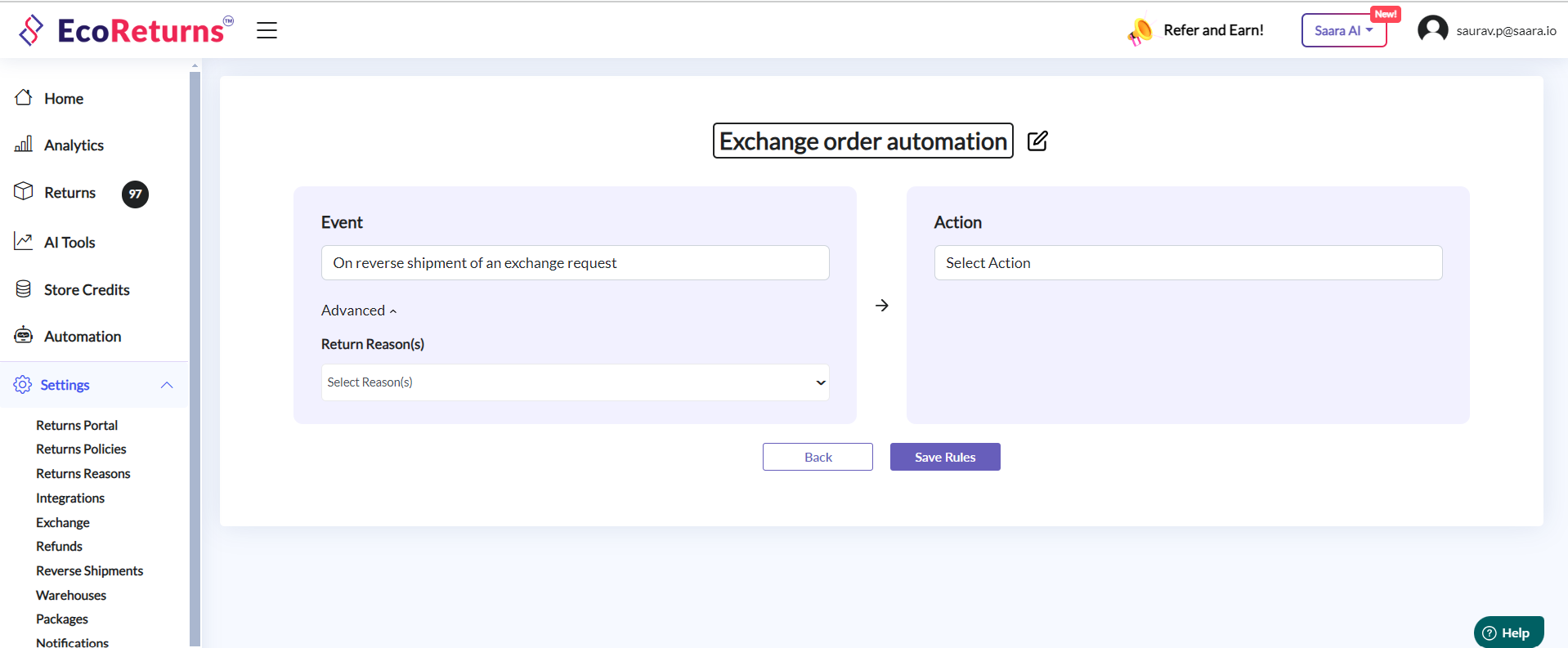
5. Under Advanced section, you can select the reasons for which you want to automatically create exchange order. In case you want to automate the process for all reasons then you can leave it empty or select all.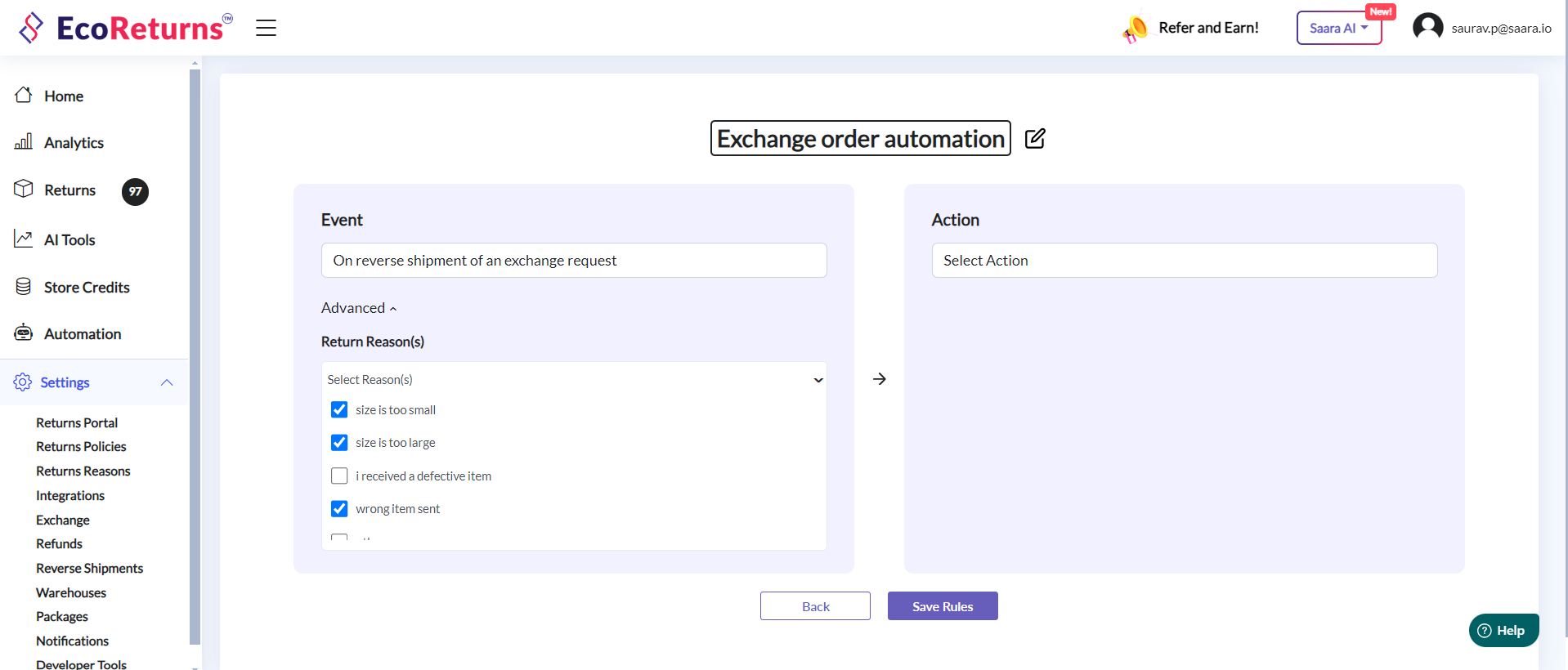
6. On the right side, select the **Action** as **Create exchange order. **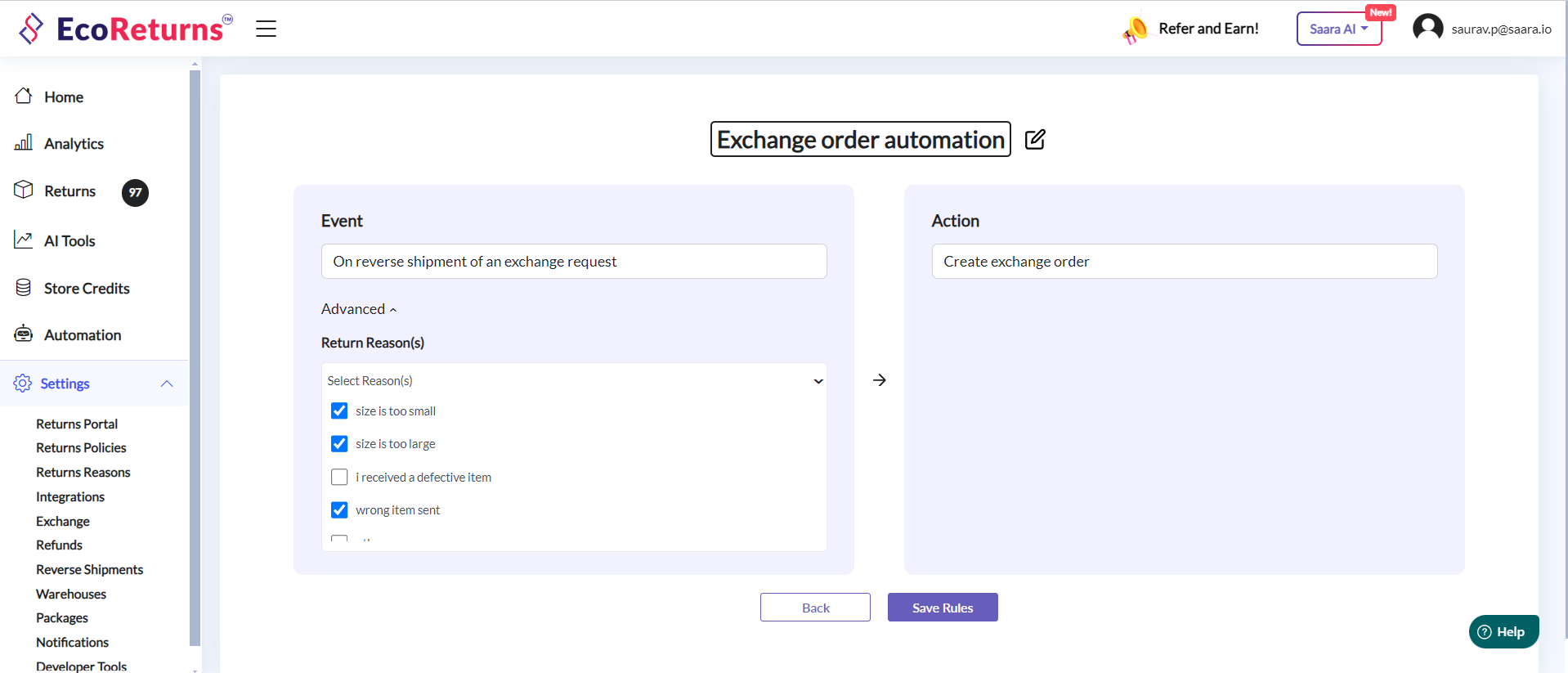
7. **Save Your Rule:** After configuring both the event with conditions and action, be sure to save your rule. This ensures that your automation rule is implemented and ready to enhance the efficiency of your return and exchange processes.
- [EcoReturns](https://help.saara.io/kb/ecoreturns?hsLang=en#main-content)
- [Getting Started](https://help.saara.io/kb/ecoreturns?hsLang=en#getting-started)
- [Settings](https://help.saara.io/kb/ecoreturns?hsLang=en#settings)
- [Integrations](https://help.saara.io/kb/ecoreturns?hsLang=en#integrations)
- [Automations](https://help.saara.io/kb/ecoreturns?hsLang=en#automations)
- [FAQs](https://help.saara.io/kb/ecoreturns?hsLang=en#faqs)
- [AI Agents](https://help.saara.io/kb/ai-agents?hsLang=en#main-content)
- [Getting Started](https://help.saara.io/kb/ai-agents?hsLang=en#getting-started)
- [FAQs](https://help.saara.io/kb/ai-agents?hsLang=en#faqs)
- [Integrations](https://help.saara.io/kb/ai-agents?hsLang=en#integrations)
- [EcoShip](https://help.saara.io/kb/ecoship?hsLang=en#main-content)
- [Getting Started](https://help.saara.io/kb/ecoship?hsLang=en#getting-started)
- [FAQs](https://help.saara.io/kb/faqs?hsLang=en#main-content)
- [Managing Coupon Codes](https://help.saara.io/kb/faqs?hsLang=en#managing-coupon-codes)
- [Return Policy](https://help.saara.io/kb/faqs?hsLang=en#return-policy)
- [Settings](https://help.saara.io/kb/settings?hsLang=en#main-content)
- [Account Settings](https://help.saara.io/kb/settings?hsLang=en#account-settings)
- Products
- [EcoReturns](https://hs.saara.io/ecoreturns)
- [EcoShip](https://hs.saara.io/ecoship)
- [FlyOS](https://hs.saara.io/ai-agents-for-ecommerce)
- Resources
- [Knowledge base](https://saara.io/saara-knowledge-base?hsLang=en-us)
- [Support](https://saara.io/ecoreturns-support?hsLang=en-us)
[.png?width=250&height=100&name=Saara-Logo%20(250x100).png "Saara-Logo (250x100)")](https://saara.io?hsLang=en)
[mailto:care@saara.io](mailto:care@saara.io)
Copyright © 2026, Saara Inc