---
title: How to add or modify warehouse address?
description: How to add or modify warehouse address in EcoReturns?
---
[Skip to content](https://help.saara.io/kb/how-to-add-or-modify-warehouse-address#main-content)
[More support](https://help.saara.io/kb/kb-tickets/new?hsLang=en) [Customer portal](https://help.saara.io/tickets-view?hsLang=en)
[.png?width=250&height=100&name=Saara-Logo%20(250x100).png)](https://saara.io/?hsLang=en)
- Products
Show submenu for Products
- [EcoReturns](https://hs.saara.io/ecoreturns)
- [EcoShip](https://hs.saara.io/ecoship)
- [FlyOS](https://hs.saara.io/ai-agents-for-ecommerce)
- Resources
Show submenu for Resources
- [Knowledge base](https://saara.io/saara-knowledge-base?hsLang=en-us)
- [Support](https://saara.io/ecoreturns-support?hsLang=en-us)
Open main navigation
Close main navigation
- Products
Show submenu for Products
- [EcoReturns](https://hs.saara.io/ecoreturns)
- [EcoShip](https://hs.saara.io/ecoship)
- [FlyOS](https://hs.saara.io/ai-agents-for-ecommerce)
- Resources
Show submenu for Resources
- [Knowledge base](https://saara.io/saara-knowledge-base?hsLang=en-us)
- [Support](https://saara.io/ecoreturns-support?hsLang=en-us)
- [More support](https://help.saara.io/kb/kb-tickets/new)
- [Customer portal](https://help.saara.io/tickets-view)
- [Raise a Ticket](https://44348979.hs-sites.com/ecoreturns-support)
[Raise a Ticket](https://44348979.hs-sites.com/ecoreturns-support?hsLang=en)
How can we help you?
- There are no suggestions because the search field is empty.
1. [Saara-knowledge-base](https://help.saara.io/kb?hsLang=en)
2. [EcoReturns](https://help.saara.io/kb/ecoreturns?hsLang=en)
3. [Settings](https://help.saara.io/kb/ecoreturns?hsLang=en#settings)
# How to add or modify warehouse address?
### How to add or modify warehouse address?
Modified on Tue, 11 Mar at 12:29 AM
**Introduction**
For a reverse shipment, providing an accurate warehouse address is essential for seamless return processing. A clearly defined return destination ensures that returned products reach the correct location without delays, minimizing lost shipments and logistical errors.
With EcoReturns, merchants can easily configure their warehouse address, ensuring hassle-free return handling and improved operational efficiency.
In case you have multiple warehouses and all the return packages needs to be returned to a particular warehouse, that can be managed in EcoReturns easily.
You can also automate or manually select the **Origin Warehouse **in case you want the item to be only shipped back to Origin warehouse if you have multiple warehouses.
**Steps to follow**
Follow the steps below to '**Add/Modify Warehouse Address'** in just a few clicks:
1\. Login to your EcoReturns dashboard.
2\. After logging in, select ‘**Warehouses**’ from the left-side of the menu under '**Settings'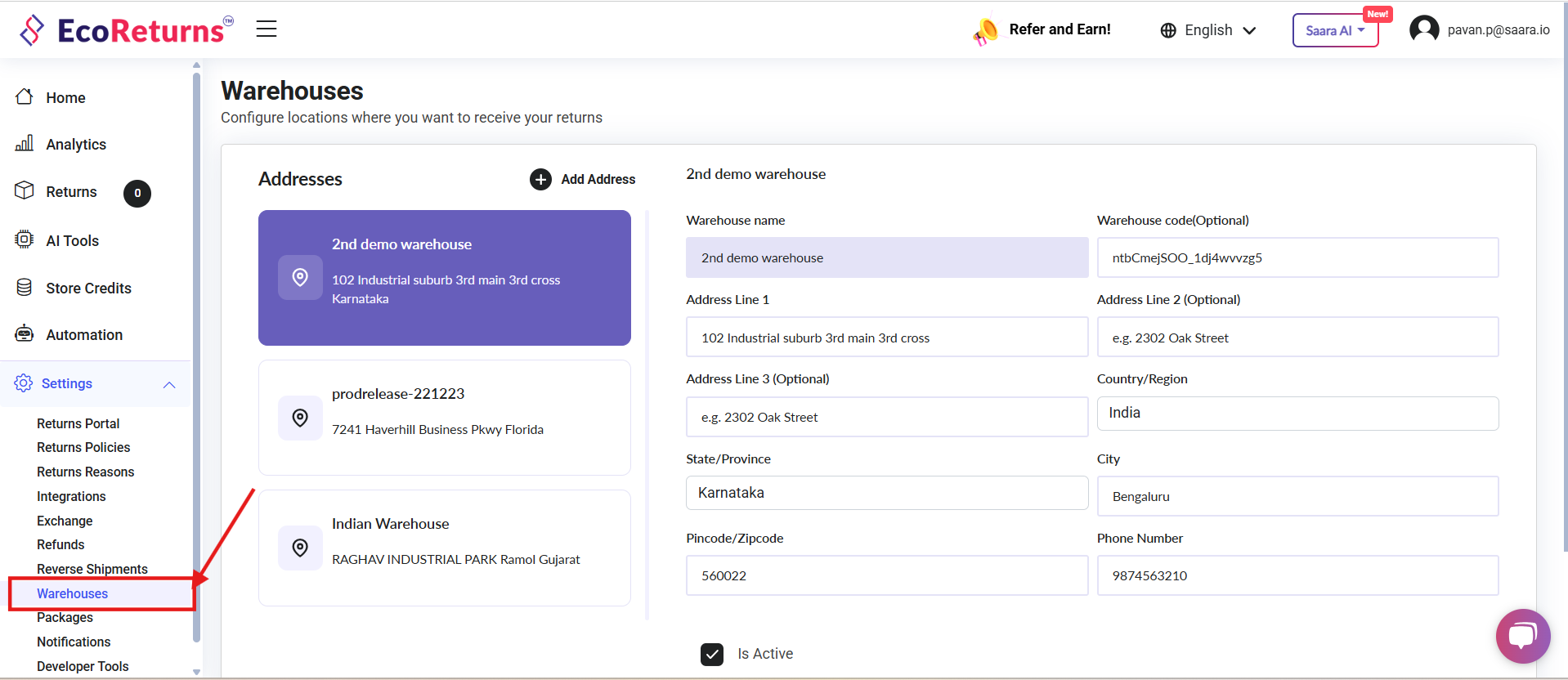**
3\. EcoReturns automatically fetches the shop location from your ecommerce platform and populates it as Warehouse address. You can modify it if necessary and click on **Update **to save the address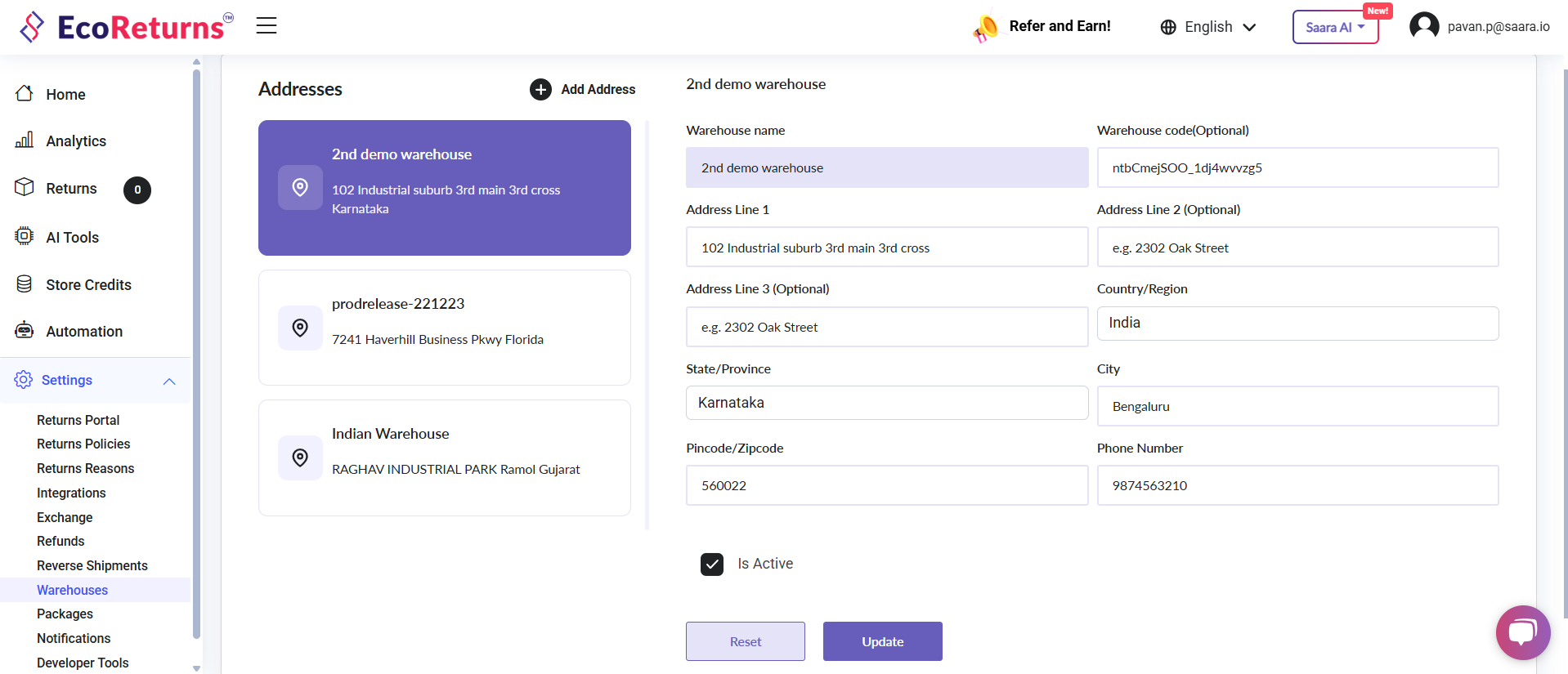
4\. If there are multiple warehouses you can click on **Add address **and fill the address fields to save warehouse address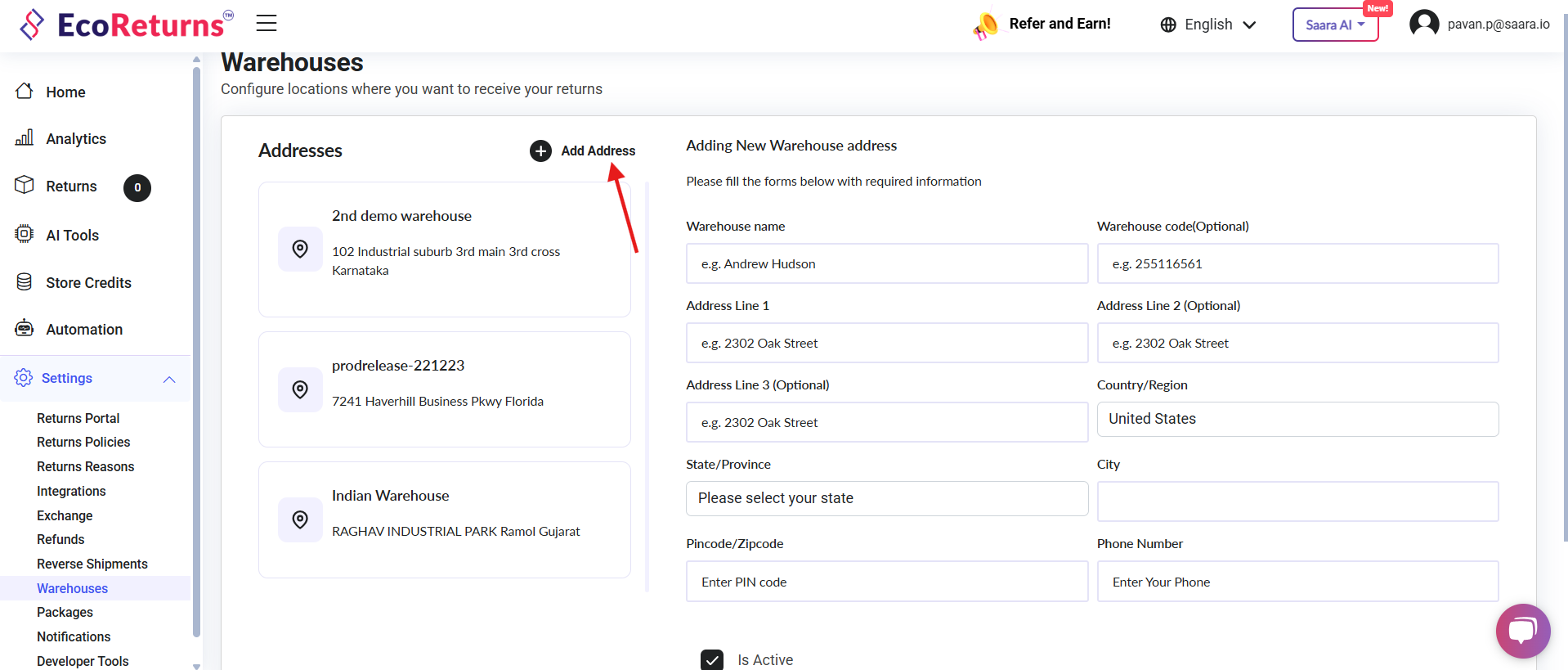
5\. Make sure the **Is Active **checkbox is checked to indicate that warehouse is active.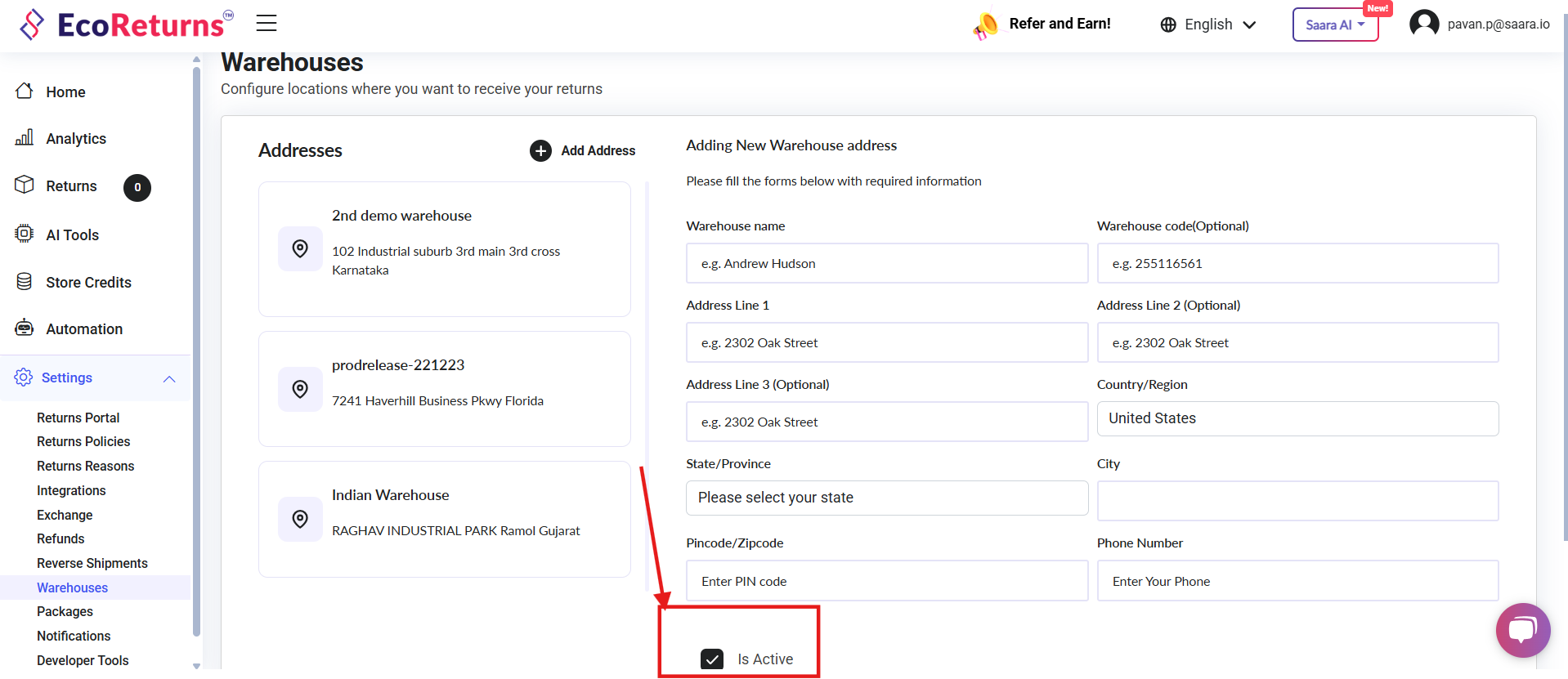
6\. If you are a dropshipping business and have lot of warehouses to add, please contact us so that we can assist you to add Warehouse addresses in bulk.
- [EcoReturns](https://help.saara.io/kb/ecoreturns?hsLang=en#main-content)
- [Getting Started](https://help.saara.io/kb/ecoreturns?hsLang=en#getting-started)
- [Settings](https://help.saara.io/kb/ecoreturns?hsLang=en#settings)
- [Integrations](https://help.saara.io/kb/ecoreturns?hsLang=en#integrations)
- [Automations](https://help.saara.io/kb/ecoreturns?hsLang=en#automations)
- [FAQs](https://help.saara.io/kb/ecoreturns?hsLang=en#faqs)
- [AI Agents](https://help.saara.io/kb/ai-agents?hsLang=en#main-content)
- [Getting Started](https://help.saara.io/kb/ai-agents?hsLang=en#getting-started)
- [FAQs](https://help.saara.io/kb/ai-agents?hsLang=en#faqs)
- [Integrations](https://help.saara.io/kb/ai-agents?hsLang=en#integrations)
- [EcoShip](https://help.saara.io/kb/ecoship?hsLang=en#main-content)
- [Getting Started](https://help.saara.io/kb/ecoship?hsLang=en#getting-started)
- [FAQs](https://help.saara.io/kb/faqs?hsLang=en#main-content)
- [Managing Coupon Codes](https://help.saara.io/kb/faqs?hsLang=en#managing-coupon-codes)
- [Return Policy](https://help.saara.io/kb/faqs?hsLang=en#return-policy)
- [Settings](https://help.saara.io/kb/settings?hsLang=en#main-content)
- [Account Settings](https://help.saara.io/kb/settings?hsLang=en#account-settings)
- Products
- [EcoReturns](https://hs.saara.io/ecoreturns)
- [EcoShip](https://hs.saara.io/ecoship)
- [FlyOS](https://hs.saara.io/ai-agents-for-ecommerce)
- Resources
- [Knowledge base](https://saara.io/saara-knowledge-base?hsLang=en-us)
- [Support](https://saara.io/ecoreturns-support?hsLang=en-us)
[.png?width=250&height=100&name=Saara-Logo%20(250x100).png "Saara-Logo (250x100)")](https://saara.io?hsLang=en)
[mailto:care@saara.io](mailto:care@saara.io)
Copyright © 2026, Saara Inc