---
title: Connect your Wix store on EcoShip
description: Connect your Wix store on EcoShip
---
[Skip to content](https://help.saara.io/kb/connect-your-wix-store-on-ecoship#main-content)
[More support](https://help.saara.io/kb/kb-tickets/new?hsLang=en) [Customer portal](https://help.saara.io/tickets-view?hsLang=en)
[.png?width=250&height=100&name=Saara-Logo%20(250x100).png)](https://saara.io/?hsLang=en)
- Products
Show submenu for Products
- [EcoReturns](https://hs.saara.io/ecoreturns)
- [EcoShip](https://hs.saara.io/ecoship)
- [FlyOS](https://hs.saara.io/ai-agents-for-ecommerce)
- Resources
Show submenu for Resources
- [Knowledge base](https://saara.io/saara-knowledge-base?hsLang=en-us)
- [Support](https://saara.io/ecoreturns-support?hsLang=en-us)
Open main navigation
Close main navigation
- Products
Show submenu for Products
- [EcoReturns](https://hs.saara.io/ecoreturns)
- [EcoShip](https://hs.saara.io/ecoship)
- [FlyOS](https://hs.saara.io/ai-agents-for-ecommerce)
- Resources
Show submenu for Resources
- [Knowledge base](https://saara.io/saara-knowledge-base?hsLang=en-us)
- [Support](https://saara.io/ecoreturns-support?hsLang=en-us)
- [More support](https://help.saara.io/kb/kb-tickets/new)
- [Customer portal](https://help.saara.io/tickets-view)
- [Raise a Ticket](https://44348979.hs-sites.com/ecoreturns-support)
[Raise a Ticket](https://44348979.hs-sites.com/ecoreturns-support?hsLang=en)
How can we help you?
- There are no suggestions because the search field is empty.
1. [Saara-knowledge-base](https://help.saara.io/kb?hsLang=en)
2. [EcoShip](https://help.saara.io/kb/ecoship?hsLang=en)
3. [Getting Started](https://help.saara.io/kb/ecoship?hsLang=en#getting-started)
# Connect your Wix store on EcoShip
### Connect your Wix store on EcoShip
Modified on Wed, 6 Dec, 2023 at 9:18 AM
Connecting your store is important to fetch product & shipping information and helps you in creating reverse shipments for your orders without hassle. Follow the steps below to connect your store on EcoShip.
You'll need 4 credentials to connect your store
1. Site URL
2. Access Token
3. Account ID
4. Site ID
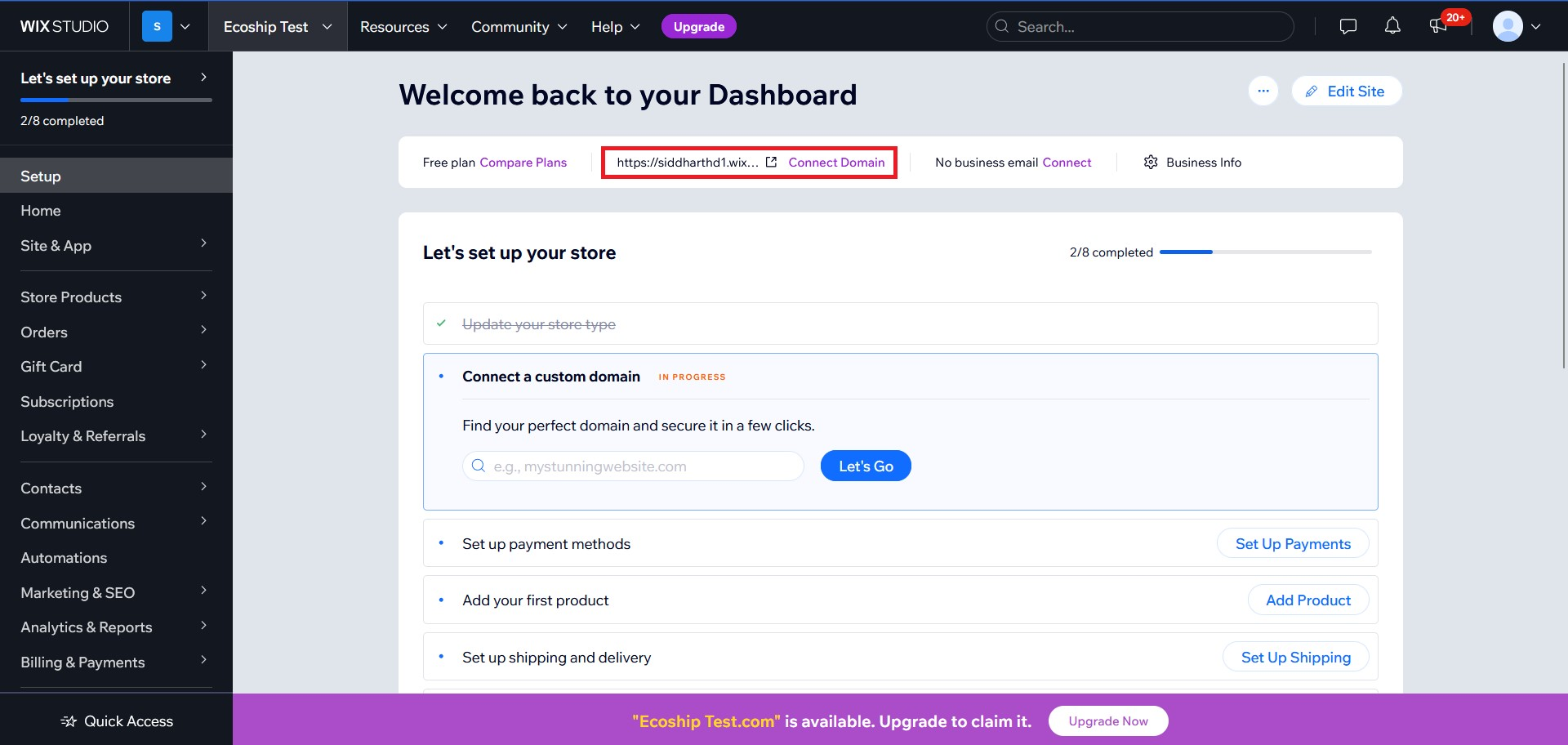
**Site URL**
- Go to [https://manage.wix.com/dashboard/](https://manage.wix.com/dashboard/) and you will find the site url on the following page
- 
Alternatively, you can also see your Site URL (domain) by clicking on "Site & App" tab on the left side of the screen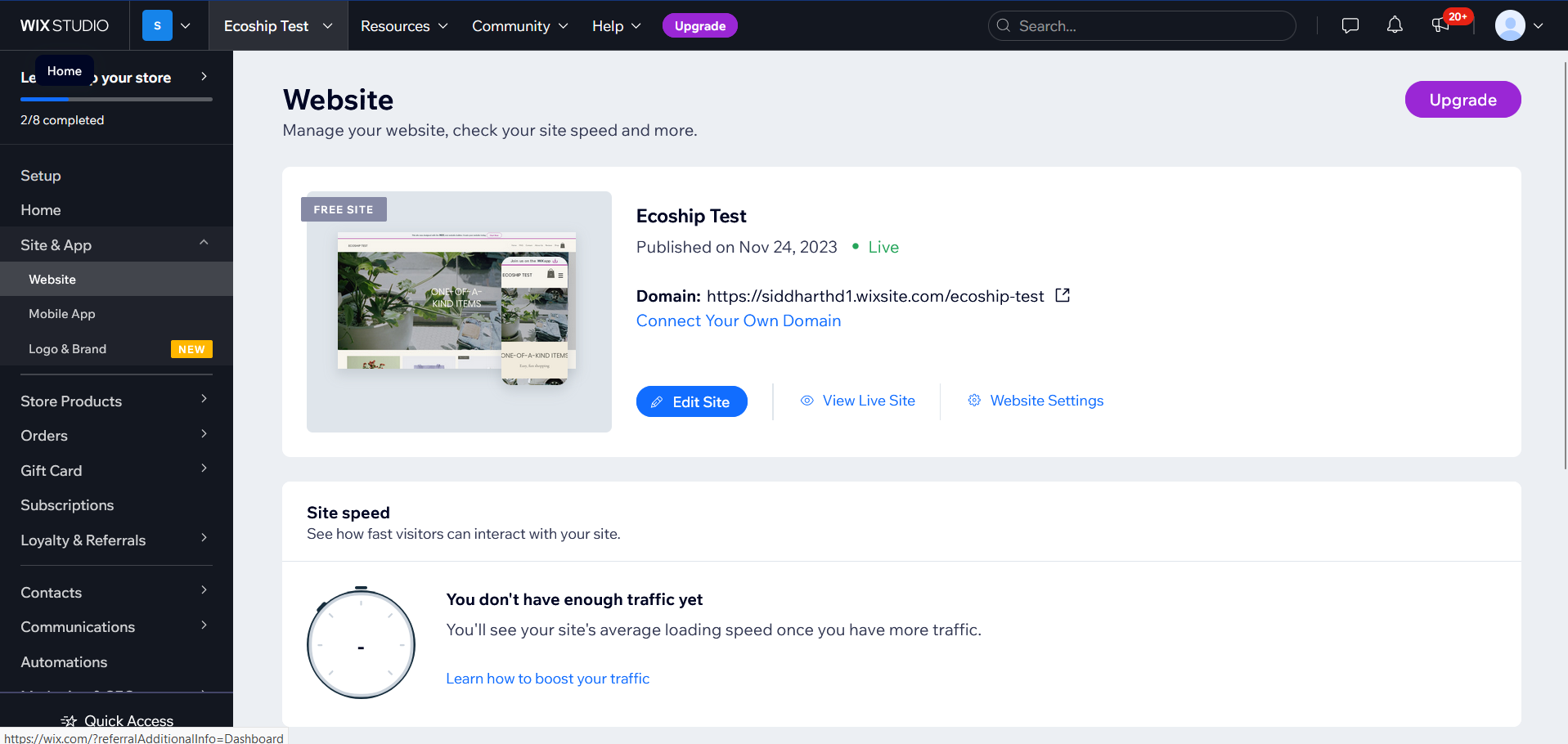
**Access token**
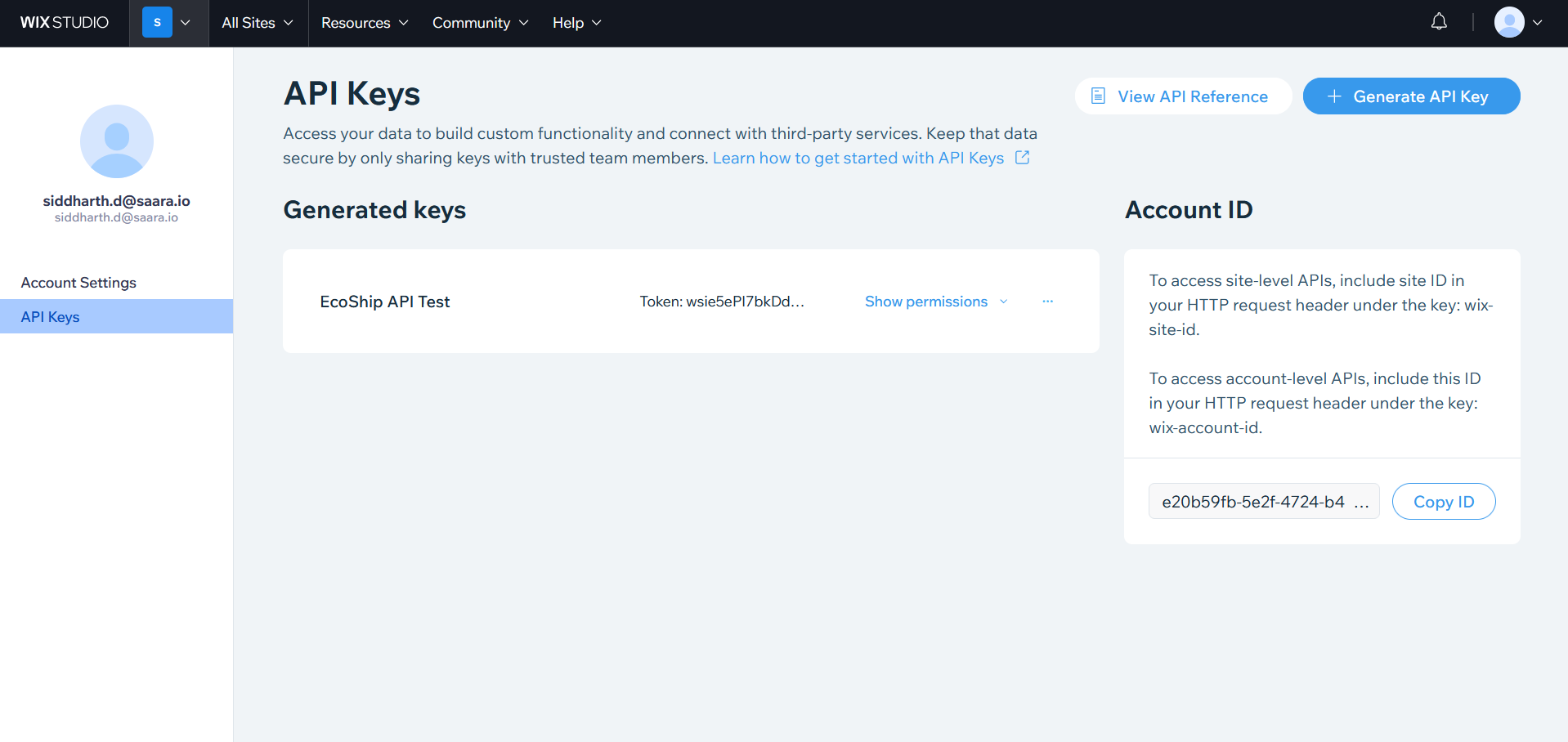
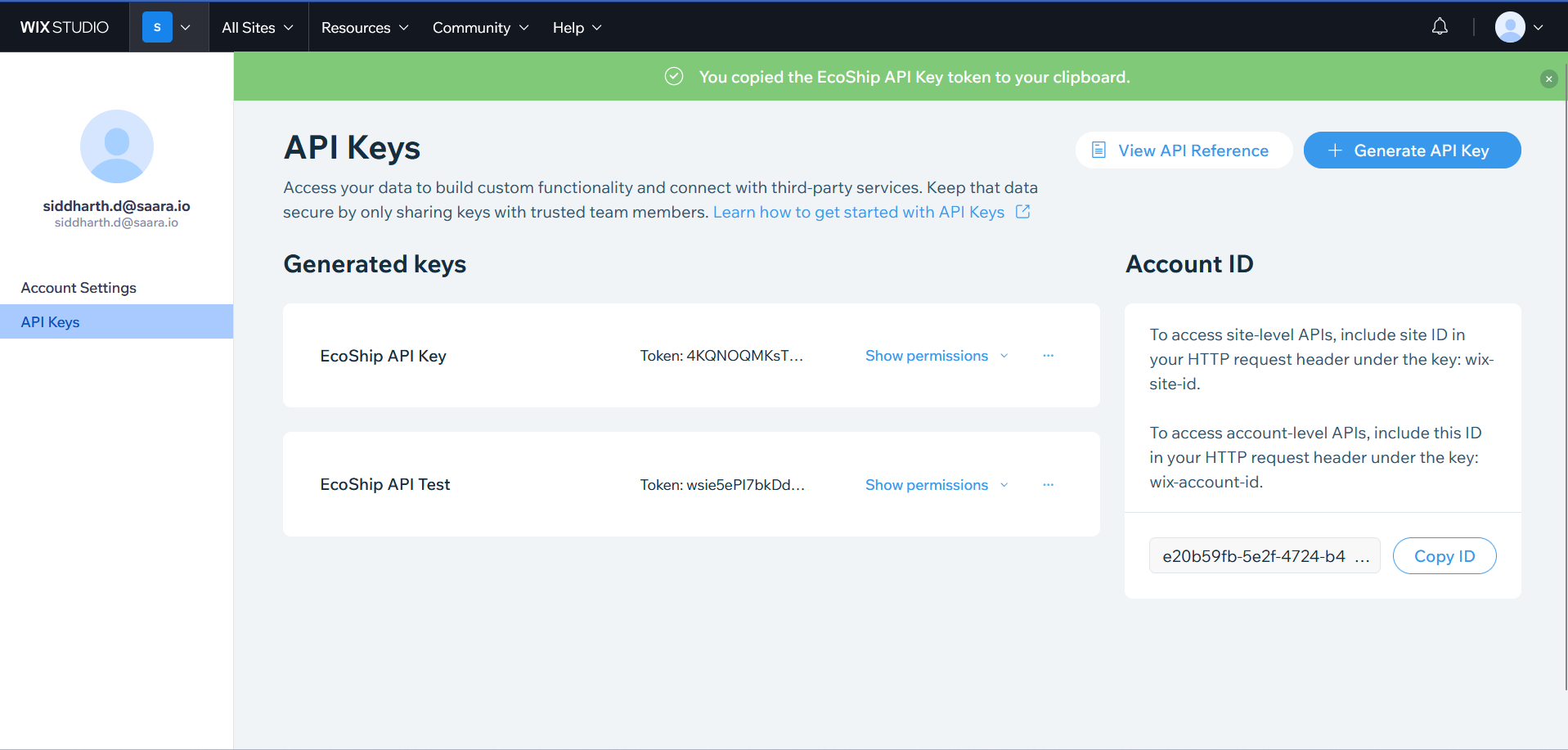
1. Click on top left corner of your screen and click on "Account Settings"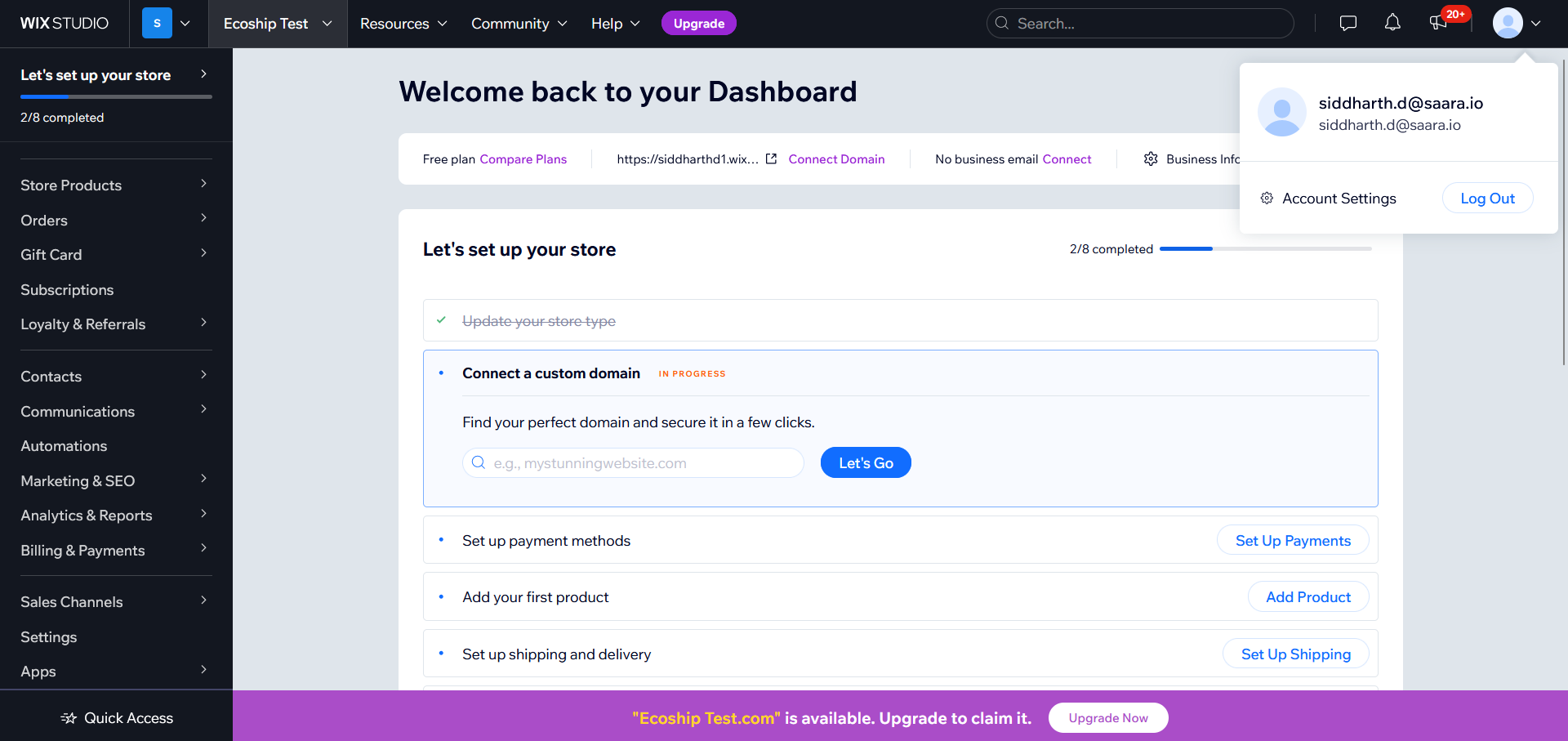
2. Click on API Keys tab on the left side of the screen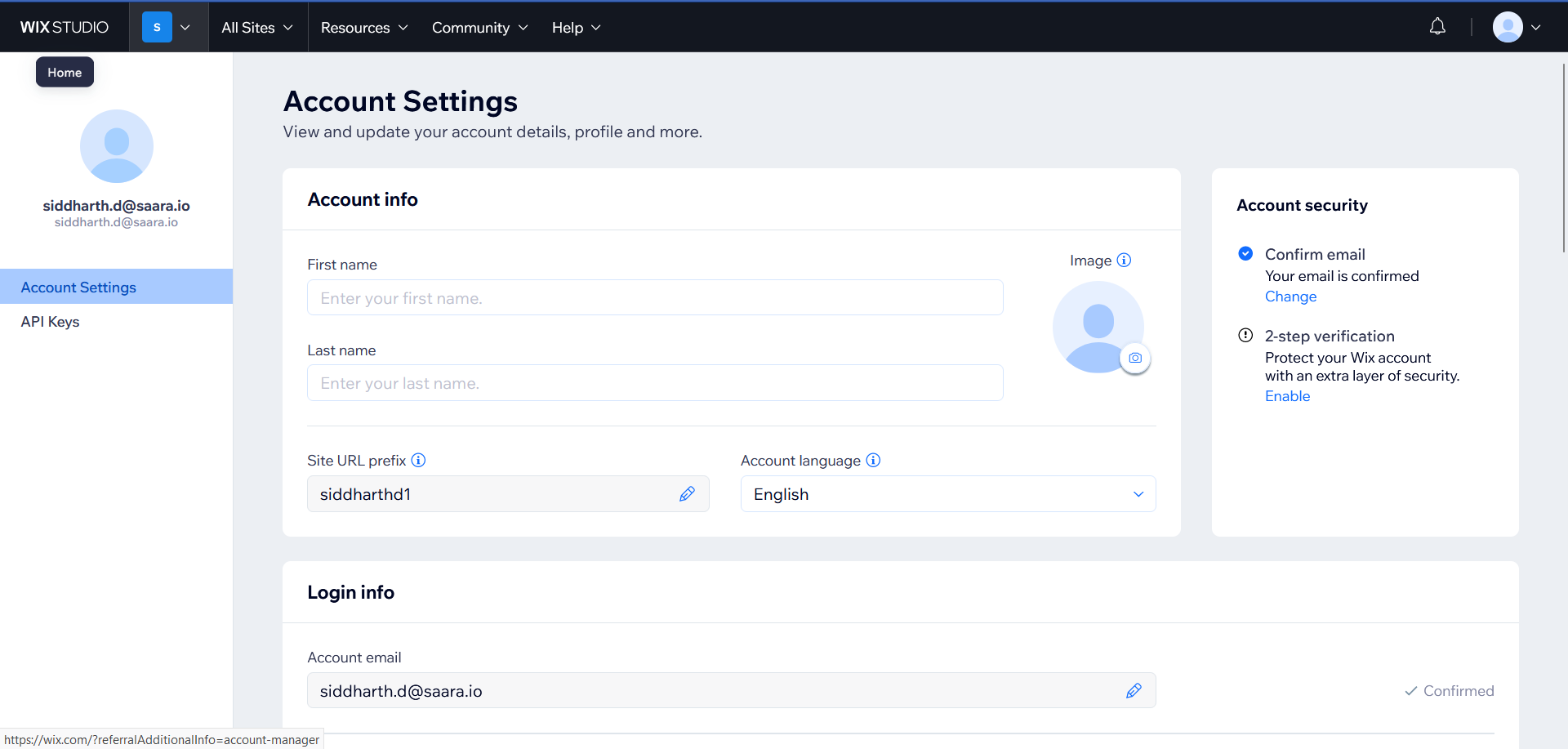
3. Click on "Generate API Key" on the top right.
4.  Name the API Key **"EcoShip API key"**and give it following permissions -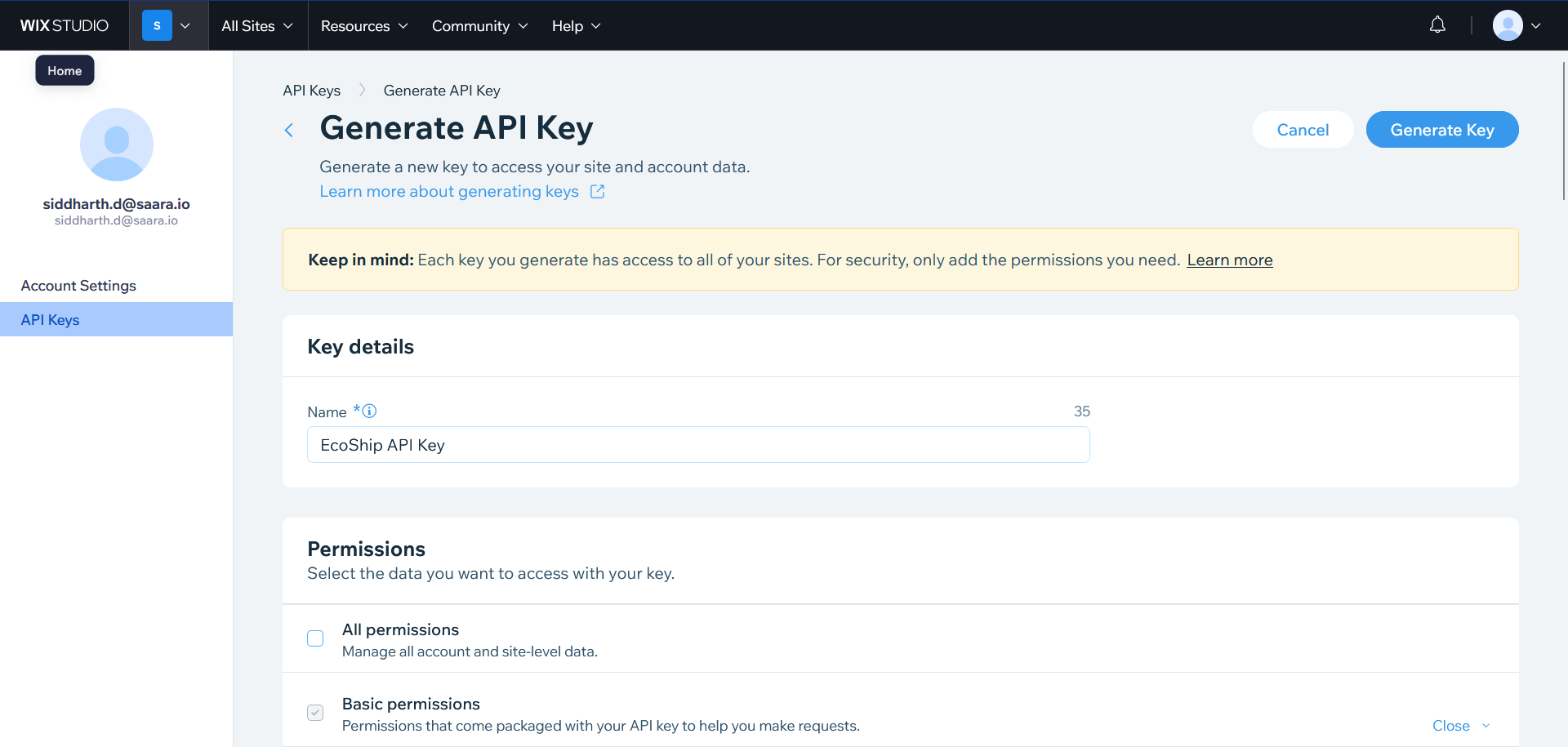
- **Basic Permissions**
- **Wix Stores **under All site permissions
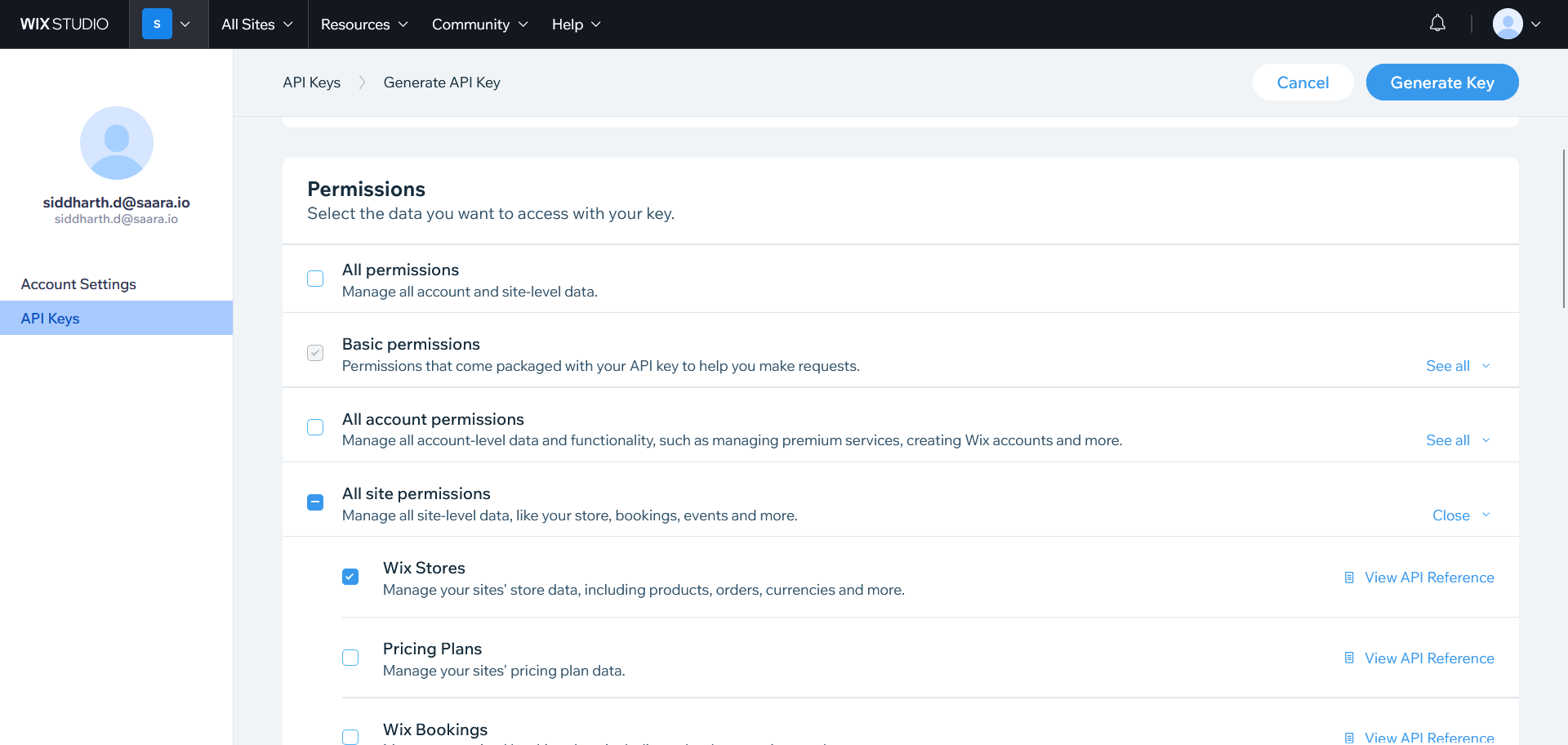
5. Click on "Generate Key"on the top right after you have set the permissions.
6. One you click on generate key button, a popup will appear which will ask you to input a verification code sent to your email.
7. After verification is done, you will be shown your generated token. Make sure to copy and save it somewhere since you won't be able to access it anywhere else and will have to create a new token once again.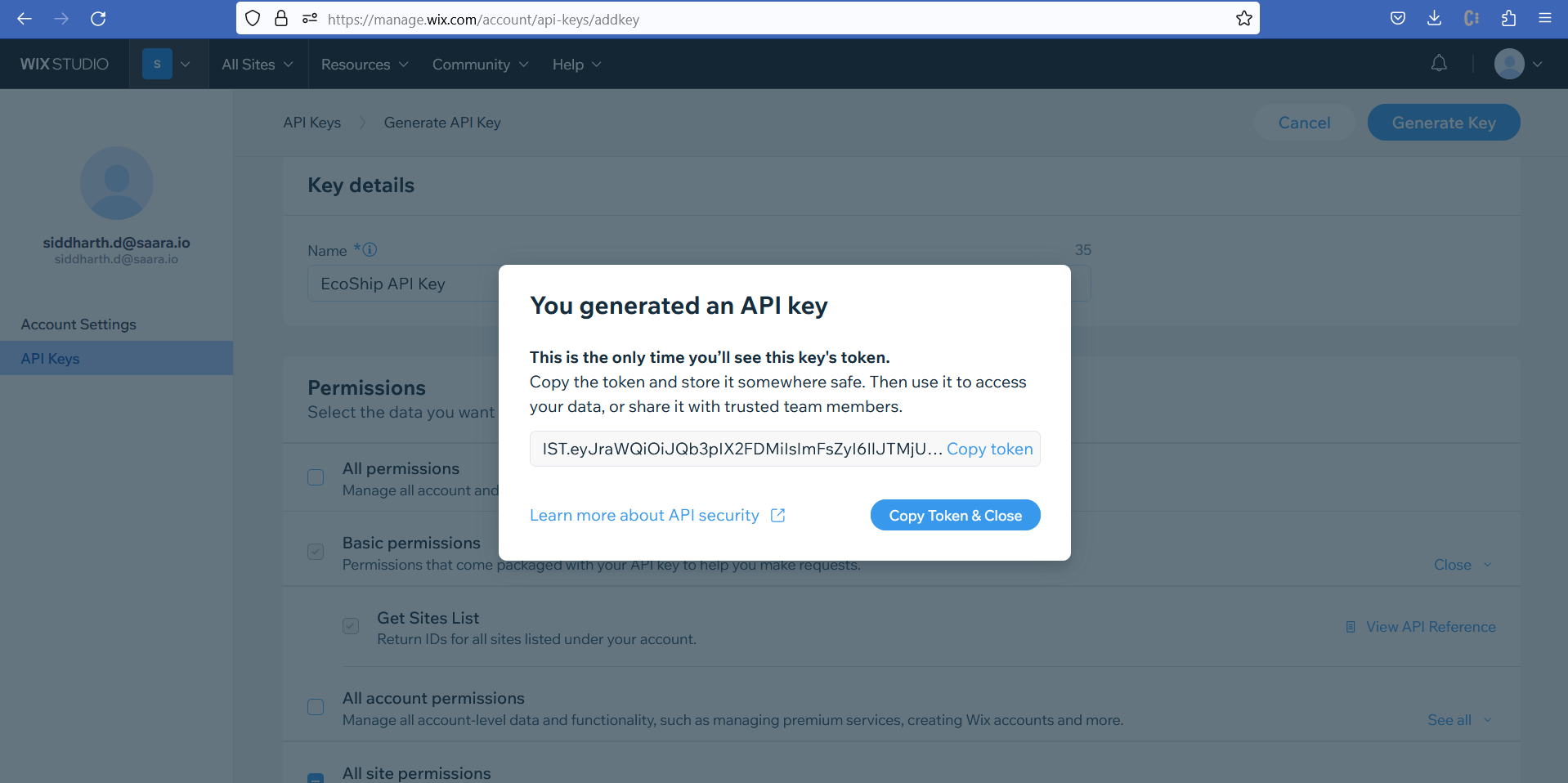
**Account ID**
- In the API Keys section, you will see your account id on the right side of the screen
- 
**Site ID**
1. Go back to the admin of the site for which you want to integrate our EcoShip
2. Look at the url of the browser. It will appear something like this -
[https://manage.wix.com/dashboard/622daf84-63f9-48c8-a7cc-290582bc1646/setup?referralInfo=sidebar](https://manage.wix.com/dashboard/622daf84-63f9-48c8-a7cc-290582bc1646/setup?referralInfo=sidebar)
3. Extract the part between dashboard and setup which in this case is **622daf84-63f9-48c8-a7cc-290582bc1646**. You can find your Site ID using the same steps. This is your site id.
- [EcoReturns](https://help.saara.io/kb/ecoreturns?hsLang=en#main-content)
- [Getting Started](https://help.saara.io/kb/ecoreturns?hsLang=en#getting-started)
- [Settings](https://help.saara.io/kb/ecoreturns?hsLang=en#settings)
- [Integrations](https://help.saara.io/kb/ecoreturns?hsLang=en#integrations)
- [Automations](https://help.saara.io/kb/ecoreturns?hsLang=en#automations)
- [FAQs](https://help.saara.io/kb/ecoreturns?hsLang=en#faqs)
- [AI Agents](https://help.saara.io/kb/ai-agents?hsLang=en#main-content)
- [Getting Started](https://help.saara.io/kb/ai-agents?hsLang=en#getting-started)
- [FAQs](https://help.saara.io/kb/ai-agents?hsLang=en#faqs)
- [Integrations](https://help.saara.io/kb/ai-agents?hsLang=en#integrations)
- [EcoShip](https://help.saara.io/kb/ecoship?hsLang=en#main-content)
- [Getting Started](https://help.saara.io/kb/ecoship?hsLang=en#getting-started)
- [FAQs](https://help.saara.io/kb/faqs?hsLang=en#main-content)
- [Managing Coupon Codes](https://help.saara.io/kb/faqs?hsLang=en#managing-coupon-codes)
- [Return Policy](https://help.saara.io/kb/faqs?hsLang=en#return-policy)
- [Settings](https://help.saara.io/kb/settings?hsLang=en#main-content)
- [Account Settings](https://help.saara.io/kb/settings?hsLang=en#account-settings)
- Products
- [EcoReturns](https://hs.saara.io/ecoreturns)
- [EcoShip](https://hs.saara.io/ecoship)
- [FlyOS](https://hs.saara.io/ai-agents-for-ecommerce)
- Resources
- [Knowledge base](https://saara.io/saara-knowledge-base?hsLang=en-us)
- [Support](https://saara.io/ecoreturns-support?hsLang=en-us)
[.png?width=250&height=100&name=Saara-Logo%20(250x100).png "Saara-Logo (250x100)")](https://saara.io?hsLang=en)
[mailto:care@saara.io](mailto:care@saara.io)
Copyright © 2026, Saara Inc