---
title: Configuring payment settings for exchanges
description: Configuring payment settings for exchanges in EcoReturns
---
[Skip to content](https://help.saara.io/kb/configuring-payment-settings-for-exchanges#main-content)
[More support](https://help.saara.io/kb/kb-tickets/new?hsLang=en) [Customer portal](https://help.saara.io/tickets-view?hsLang=en)
[.png?width=250&height=100&name=Saara-Logo%20(250x100).png)](https://saara.io/?hsLang=en)
- Products
Show submenu for Products
- [EcoReturns](https://hs.saara.io/ecoreturns)
- [EcoShip](https://hs.saara.io/ecoship)
- [FlyOS](https://hs.saara.io/ai-agents-for-ecommerce)
- Resources
Show submenu for Resources
- [Knowledge base](https://saara.io/saara-knowledge-base?hsLang=en-us)
- [Support](https://saara.io/ecoreturns-support?hsLang=en-us)
Open main navigation
Close main navigation
- Products
Show submenu for Products
- [EcoReturns](https://hs.saara.io/ecoreturns)
- [EcoShip](https://hs.saara.io/ecoship)
- [FlyOS](https://hs.saara.io/ai-agents-for-ecommerce)
- Resources
Show submenu for Resources
- [Knowledge base](https://saara.io/saara-knowledge-base?hsLang=en-us)
- [Support](https://saara.io/ecoreturns-support?hsLang=en-us)
- [More support](https://help.saara.io/kb/kb-tickets/new)
- [Customer portal](https://help.saara.io/tickets-view)
- [Raise a Ticket](https://44348979.hs-sites.com/ecoreturns-support)
[Raise a Ticket](https://44348979.hs-sites.com/ecoreturns-support?hsLang=en)
How can we help you?
- There are no suggestions because the search field is empty.
1. [Saara-knowledge-base](https://help.saara.io/kb?hsLang=en)
2. [EcoReturns](https://help.saara.io/kb/ecoreturns?hsLang=en)
3. [Settings](https://help.saara.io/kb/ecoreturns?hsLang=en#settings)
# Configuring payment settings for exchanges
### Configuring payment settings for exchanges
Modified on Thu, 3 Oct, 2024 at 12:19 AM
### **Introduction**
In today’s e-commerce environment, enabling product replacements or exchanges is a crucial factor to build trust & loyalty in customers for brands. Studies and reports show that about 50% of returns in the fashion industry are due to size and fitting issues.
EcoReturn's efficient exchange process allows customers to exchange with same or different product. You can also choose when you want to collect the payment when customers exchange with a product of higher value.
### **Configuring Exchange Payment**
**To configure exchange payment settings you need to follow the below-mentioned steps:-**
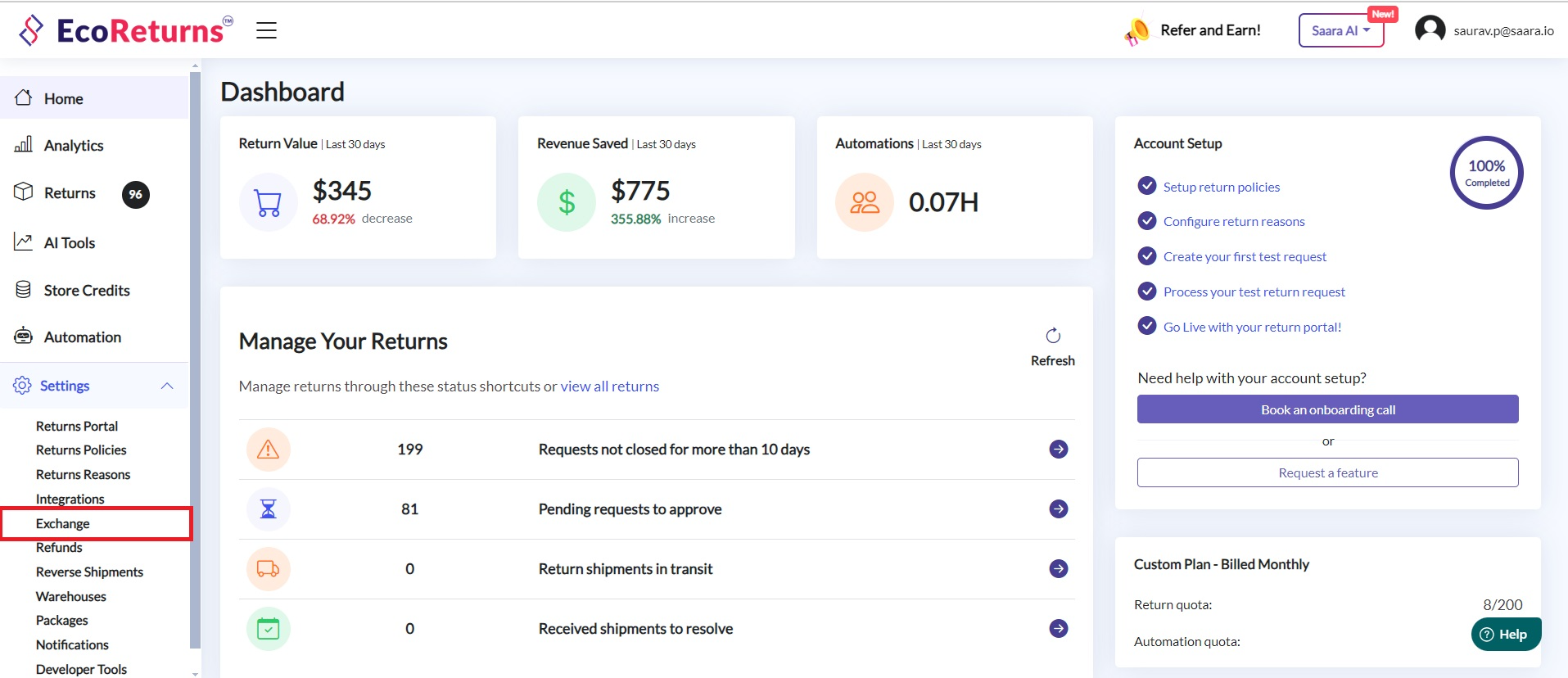
1\. Go to **Exchange** under **Settings**
2\. Scroll down to find the **Exchange payment **section.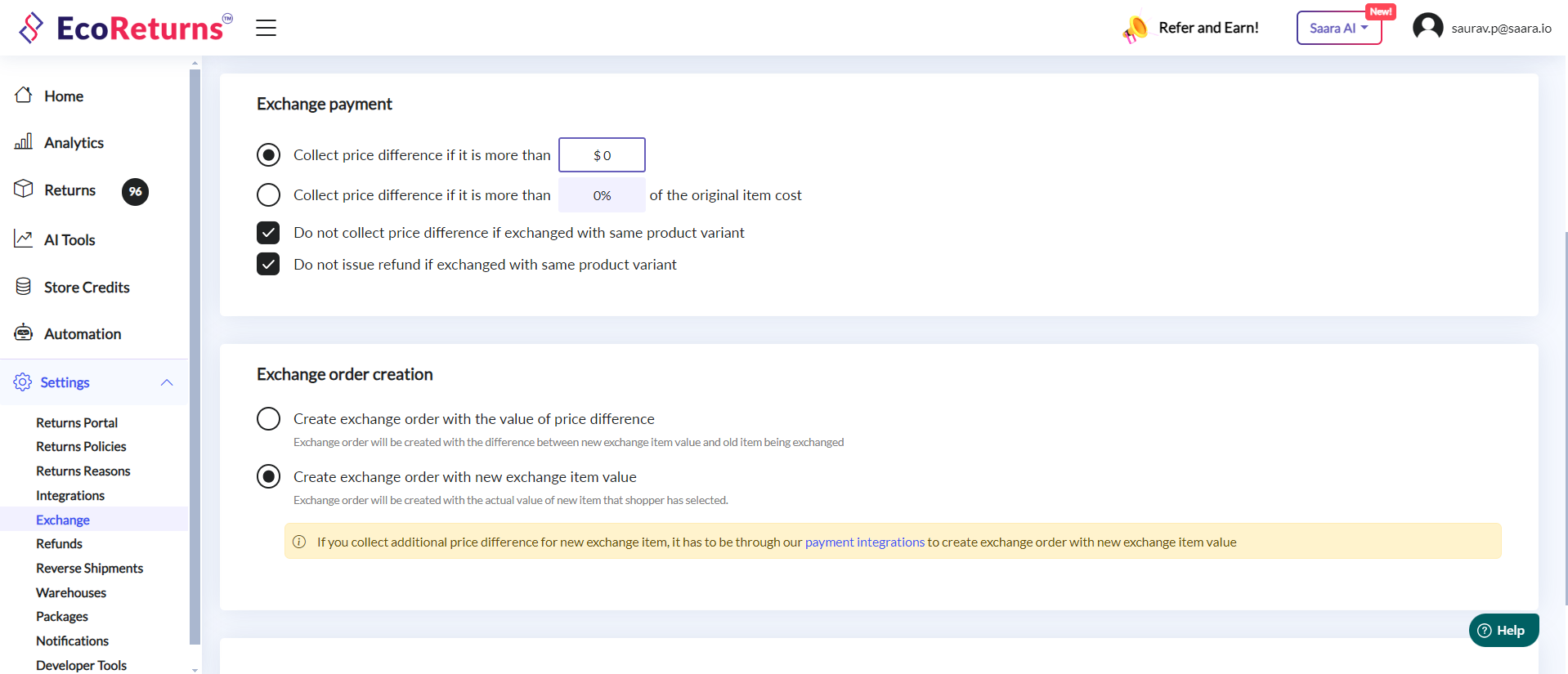
3\. **Exhange payment **settings will be applicable for both exchange with same product and different product.
4\. Firstly, while exchanging with a variant of same product you can configure whether you want to collect the payment or refund the price difference in those cases or not.
5. If there are price differences in variants of the same product and you do not wish to collect it if exchanged with a higher value item, select the checkbox "**Do not collect price difference if exchanged with same product variant".**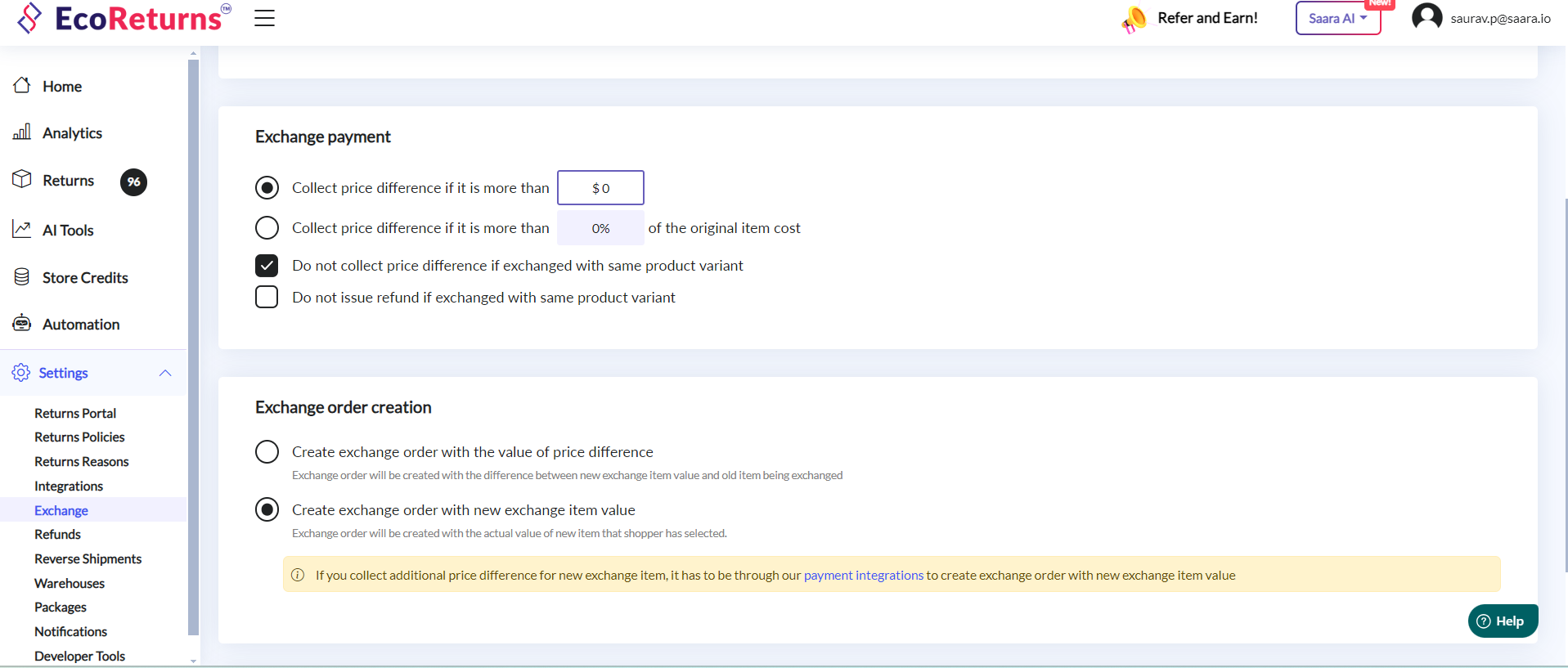
6\. Similarly, if you do not wish to refund the price difference if exchanged with a higher value item, select the checkbox "**Do not issue refund if exchanged with same product variant".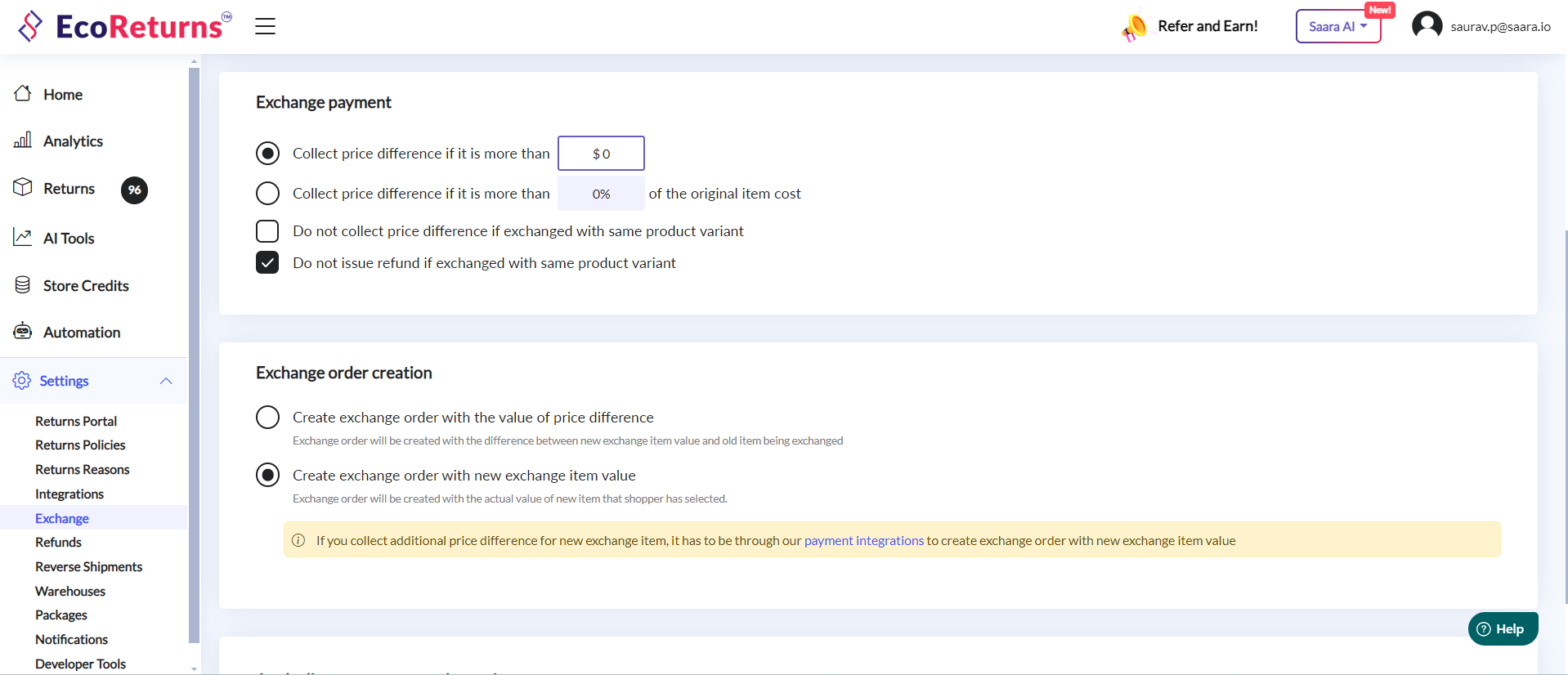**
7\. While exchanging with a higher value item, you can configure the threshold above which you want to collect payment to improve customer delight This can be configured in 2 ways.
1. **Flat value based - **You can configure to collect the payment if the price difference between new item and old item is more than a certain flat value. ($5, $10 etc). You can set it as 0 if you want to collect the full price difference in all cases.
2. **Percentage(%) based - You can configure to collect the payment if the price difference between new item and old item is more than a certain percentage value. (5%, 10% etc) of the original item cost. You can set it as 0 if you want to collect the full price difference in all cases.**
**8. You can integrate with any of our supported payment gateways for reliable payment collection.**
- [EcoReturns](https://help.saara.io/kb/ecoreturns?hsLang=en#main-content)
- [Getting Started](https://help.saara.io/kb/ecoreturns?hsLang=en#getting-started)
- [Settings](https://help.saara.io/kb/ecoreturns?hsLang=en#settings)
- [Integrations](https://help.saara.io/kb/ecoreturns?hsLang=en#integrations)
- [Automations](https://help.saara.io/kb/ecoreturns?hsLang=en#automations)
- [FAQs](https://help.saara.io/kb/ecoreturns?hsLang=en#faqs)
- [AI Agents](https://help.saara.io/kb/ai-agents?hsLang=en#main-content)
- [Getting Started](https://help.saara.io/kb/ai-agents?hsLang=en#getting-started)
- [FAQs](https://help.saara.io/kb/ai-agents?hsLang=en#faqs)
- [Integrations](https://help.saara.io/kb/ai-agents?hsLang=en#integrations)
- [EcoShip](https://help.saara.io/kb/ecoship?hsLang=en#main-content)
- [Getting Started](https://help.saara.io/kb/ecoship?hsLang=en#getting-started)
- [FAQs](https://help.saara.io/kb/faqs?hsLang=en#main-content)
- [Managing Coupon Codes](https://help.saara.io/kb/faqs?hsLang=en#managing-coupon-codes)
- [Return Policy](https://help.saara.io/kb/faqs?hsLang=en#return-policy)
- [Settings](https://help.saara.io/kb/settings?hsLang=en#main-content)
- [Account Settings](https://help.saara.io/kb/settings?hsLang=en#account-settings)
- Products
- [EcoReturns](https://hs.saara.io/ecoreturns)
- [EcoShip](https://hs.saara.io/ecoship)
- [FlyOS](https://hs.saara.io/ai-agents-for-ecommerce)
- Resources
- [Knowledge base](https://saara.io/saara-knowledge-base?hsLang=en-us)
- [Support](https://saara.io/ecoreturns-support?hsLang=en-us)
[.png?width=250&height=100&name=Saara-Logo%20(250x100).png "Saara-Logo (250x100)")](https://saara.io?hsLang=en)
[mailto:care@saara.io](mailto:care@saara.io)
Copyright © 2026, Saara Inc